




 Rename Master Rename Master
|



|
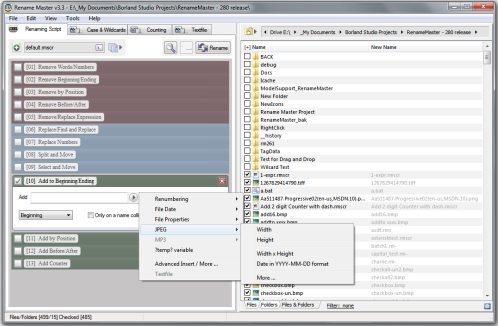
This utility will add, remove, or replace parts of the filename with ease and also supports renaming via file properties, MP3 tags, JPEG JFIF and EXIF tags, Video tags, and text files. Batch renaming that's simple to use, yet still very powerful.
Delphi XE2 source code included (v3.18 and above)
- Intelligent number sorting
- Full Unicode filename support
- File and folder renaming
- Custom filelist columns
- Auto-Preview
- Subfolder Scanning to rename files in multiple folder
- Renaming Variables for JPEG/MP3/Video tags, file properties, counters, and more
- Scripts to save commonly used renaming options
- [*] and [?] command prompt style wildcards, or full Regular Expression support
- Optional Explorer integration for right-clicking on files/folders or using "Send To"
- Case Changing and Textfile importing
- Command line options for batch renaming
Changes in v3.4
[download replaced by above version]
New:(Configuration)
- Renaming Script option for Auto-Collapse
- Renaming Script font option
- option to disable autoclear of the Filter
Fix:(File List)
- issue with colors when changing the Filter
- date sorting issue in custom columns
Fix:(Misc)
- improved illegal date detection
Fix:(Renaming Script)
- tweaks to description font
- checkbox drawing issue
- issue with date formatting and JPEG dates
- Select and Move options not saved in script
Changes in v3.3
[download replaced by above version]
New:(Renaming Script)
- updated the look for improved readability and usability
- created new 'Select and Move' step
- added a right-click menu for each step
- added ?temp? variable to Insert popup menu
- updated some Remove steps to include a replace option
- updated default script
New:(Configuration)
- added color settings for the Renaming Script
New:(Getting Started Wizard)
- updated the help wizard with new examples and updated text
New:(Folder Browser)
- added a close button
New:(Misc)
- new and updated example scripts archive
New:(File List)
- added file/folder display tabs
- moved the Folder Browser button
- moved and updated the Filter option
Fix:(File List)
- column size setting issue on load
Fix:(Path Control)
- timing issue when selecting a folder from a dropdown list
Fix:(Renaming Script)
- issues with some descriptions
- issues with counters on conditional steps
Changes in v3.2
[download replaced by above version]
New:(Renaming Script)
- updated Remove Expression step to also replace an expression
- added a new File Contents meta-variable
New:(Textfile Wizard)
- added a page for automatically generating a script
New:(Configuration)
- added color options
New:(About Window)
- added button to check for new versions
Fix:(Filelist)
- sorting issues
- cosmetic changes for the "New Name" column
Fix:(Misc)
- error when renaming a single file
- issue with date format routine and "correct date" option
Changes in v3.1
[download replaced by above version]
Fix:(Filelist)
- blank file names when using the "Send To" Explorer feature on a brand new install
- sort issues for some non-English Windows systems
- minor issue with Filter color
Fix:(Textfile)
- access error when choosing a textfile to load
Fix:(Renaming Script)
- EXIF date tag data not detected in JPEG files
Changes in v3.0
[download replaced by above version]
New: Unicode support
- added support for filenames, renaming operations, and scripts using Unicode characters
New:(Wide Layout Mode)
- new menu option [View>Toggle Wide Layout]
- Wide Layout is on by default for a new install
New:(Renaming Script)
- created a new 'Scripting Step Tools' button
- 'Help' button added to each scripting step
- Shift+Click on the Delete button will reset the current step
- (Replace Numbers Step) added option to replace numbers with a phrase
- added environment variable support
New:(Thumbnail Window)
- reworked the Thumbnail Window
- added support for GIF, TIFF and PNG graphics files
- added support for thumbnail TXT, INI, PDF, and some video files
- supports file opening and opening the File Tags window
New:(File Tags Window)
- support for Video files [AVI, MPG/MPEG, ASF/WMV, MOV/MP4/M4V]
- added width, height, and length tags for video formats
- added addition metadata tag support for some video file formats
- changed columns to 'Name', 'Tag', 'Contents'
New:(Configuration)
- added option to always show full Renaming Step descriptions
- added option for detecting empty/missing meta-variables
- added option for detecting Windows Environment Variables
- added option to always show step buttons
New:(Filelist)
- added 'illegal' filename detection for newname column
- rewrote filelist highlighting code
- added TIFF GIF PNG support in Large Thumbnail view
New:(Tools Menu)
- added Highlight Illegal menu item
New:(Folder Tools)
- add Files/Folders option
New:(File Path)
- updated breadcrumb control cosmetics
Fix:(Renaming Script)
- 'Add at Position' issue addressed
- color changes for the Expand/Collapse buttons
- minor changes to Remove Expression step
- renamed 'Replace Phrase' step to 'Find and Replace'
- error when enabling 'Remove Expression' with no options checked
- workaround for illegal EXIF values
Fix:(File List)
- improved speed of 'Preview' when working with large file sets
- Large Thumbnail View not refreshed correctly on program start
- workaround for files on shares that have missing timestamps
- 'Integer Overflow' when scanning empty MP3 files
- updated the right-click menu to support videos
Fix:(File Path)
- made more functional even when small
- various minor fixes
Fix:(Configuration)
- toolbar setting now saved on exit
- tweaks to color settings
Fix:(Filter)
- increased the delay before activating auto-preview
Fix:(Excluded Files)
- file selection refreshed on close
Fix:(Split and Move)
- issue with Auto-Gen sometimes leaving a trailing space
ANY USE BY YOU OF THE SOFTWARE IS AT YOUR OWN RISK. THE
SOFTWARE IS PROVIDED FOR USE "AS IS" WITHOUT WARRANTY OF
ANY KIND. TO THE MAXIMUM EXTENT PERMITTED BY LAW, THE
SOFTWARE'S CREATOR DISCLAIMS ALL WARRANTIES OF ANY
KIND, EITHER EXPRESS OR IMPLIED, INCLUDING, WITHOUT
LIMITATION, IMPLIED WARRANTIES OR CONDITIONS OF
MERCHANTABILITY AND FITNESS FOR A PARTICULAR PURPOSE.
THE SOFTWARE'S CREATOR IS NOT OBLIGATED TO PROVIDE
ANY UPDATES OR UPGRADES TO THE SOFTWARE. THE INCLUDED
PROGRAM AND SOURCE CODE MAY NOT BE MODIFIED AND DISTRIBUTED
FOR COMMERCIAL GAIN AS A NEW PRODUCT.