





 ArsClip ArsClip
|



|
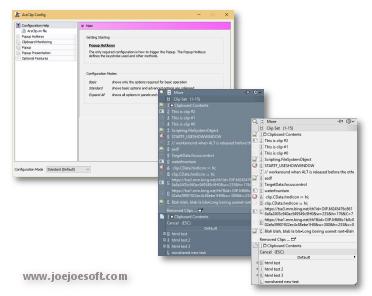
ArsClip used to be barebones, but I think I can safely say that it has become a nicely featured and highly configurable program, due to user feedback. The program now specializes in copy-and-paste automation tasks.
Delphi XE2 source code included
- Permanent Clips/Macros for copying and pasting automation
- Picture, RichText, File Copy, Unicode, HTML support
- Highly configurable
- Win7 Jumplist support
- Optional Clipboard Bar -- clipboard viewer
- Optional Global Clipboard to shares clips with other Windows and Android devices
This program requires no installation, but an optional setup program is included. Supported on Windows XP through Windows 10.
Changes in v5.46
Download acv546.zip
(Window: Configuration)
New: added "Program Center" option for Popup placement
(Window: Edit Permanent Clip)
New: updated the CLIPBOARDFIND macro to support \uXXXX escape for Unicode characters
New: updated to support new JavaScript "deletePopupClip(int)" function
(Window: Popup)
New: if the first menu item is a Clipset Header, highlight the next item when first showing the Popup
New: icon shown on current Permanent Clips with Global Hotkeys
New: hotkey shown on hover for current Permanent Clips
Fix: issue scaling small pictures for Popup Clips
Fix: issue when using a Modkey+Click, where the action may simulate keystrokes
(Window: Edit Clips/Macros)
Fix: "Destroy Selected" not working for all selected clips
(Misc)
Fix: issues when restarting Windows
Changes in v5.45
Download acv545.zip
(Window: Popup)
Fix: "Current Clipboard" was blank for pure HTML Clips
Fix: case where shortcut keys were shown in Permanent Clips in No Focus mode
Fix: 'Clipboard Only' message not always properly displayed
Fix: Pinned shortcut keys were reserved even when Pinned items not shown
(Window: Edit Clips/Macros)
Fix: major rework to Permanent Clips/Macros list visuals
Fix: updated "_Alter Clipboard" list to use checkboxes for enabled clips
Fix: when moving clips to/from groups that use "Enabled", remove/add the enabled flag
(Window: Edit Permanent Clip)
New: JavaScript clip now supports newer JavaScript features (IE11)
New: JavaScript [STAYOPEN] option for "_Clip Menu" scripts
New: automatic help link now detects MACRO commands for JavaScript clips
New: movePinnedClip()/movePopupClip() JavaScript routines
Fix: "_Clip Menu" group Menu Caption sometimes saved with "[KEYS]" in name.
Fix: "_Clip Menu item" menu was always disabled when creating a new Permanent Clip
(Window: Configuration)
New: added "run _Clip Menu script" menu to Click Action setting (Menu Items ... Popup Clip Icons)
New: update Kestrokes/Clicks with a link to the "Click Action" setting
(Window: Clip Menu)
Fix: Clip Menu window race condition when clicking (Pin/Unpin Clip)
(Window: Tooltip Hint)
New: HTML clip font sizes can now scale smaller for the Tooltip Hint
Fix: HTML clip workaround for hard to read text foreground and background colors
(Misc)
New: added "-exit" command line option to gracefully end the program
Fix: crash issue if the hidden main window was sent multiple "close" messages
Fix: HTML Clip visual issue if background color is set to "none".
Fix: rename Explorer Compatibility mode to No Focus mode
Fix: replaced most old web browser controls in the program
Changes in v5.44
Download acv544.zip
(Window: Popup)
New: added 'Toggle Transparent' button to Title Bar
New: added 'Toggle Keystrokes' button to Title Bar when in Pinned mode
New: added new Paste Selected mode button on the Menu Bar
New: pinned clips also show the type of the clip on the pinned marker
Fix: issue pasting clips in Pinned mode
Fix: "Always show filter" option not working if mouse cursor over Popup when shown
Fix: reworked the Pinned Mode to be more stable
Fix: possible access violation when running a macro a global hotkey while the Popup is showing
Fix: when showing the Popup using the system tray, the Popup is now only shown on one monitor
(Window: Getting Started)
New: added "Learning Scripts/Macros" tab
(Window: Edit Permanent Clip)
New: added a [CLIPMENUTOTEXT] command for Clip Menu items
New: created new ["_Clip Menu" Only] menu under [Insert Commands]
Fix: updated [View>Command Reference] and [View>JavaScript Reference]
Fix: bug where a new permanent item not shown (when saved, but then cancel pressed)
Fix: update documentation for macro commands who's position do not matter (Eg. Optional Modes)
(Window: Edit Clips/Macros)
Fix: updated Permanent Group help hints
(Window: Edit Clips/Macros>Databases)
Fix: "copy to Local Permanent" menu could produce duplicate Permanent Groups
(Window: Edit Clips/Macros>Permanent Clips/Macros)
Fix: update documentation for Permanent Groups
(Window: Paste And Select [deprecated])
Fix: Paste Selected issue when list is empty
Fix: paste selected button position issues when resized
NOTE: this window has been replace by Paste Selected mode on the Popup
(Window: Configuration)
New: updated Arsclip.ini information for new "FormScaling" hidden variable
Fix: typos
Fix: changing up/down setting in Popup Presentation not updating Popup Preview
Fix: update arsclip.ini info to mention exiting the program before editing
(Misc)
Fix: "Program Corner" configuration option updated for multi-monitor issue
Fix: various debug logging improvements
Changes in v5.43
[download replaced by above version]
(Window: Popup)
New: Pinned/Popup Clips can be dragged into each others lists
(Window: Edit Permanent Clip)
New: Updated "Online Code Examples" to not connect unless the "Connect" button is pressed
Fix: JavaScript writeDebugText() not working when running nested scripts via [RUNCLIP]
Fix: improved error reporting when debugging clips, including [RUNCLIP] issues
Fix: possible exception when clicking an empty line of text in the window
(Window: Configuration)
New: updated ArsClip.ini file > [Hidden] section information
(Misc)
New: added new [Hidden] variable JavaScriptTimeoutMS to set an optional timeout for scripts
New: updated the Debug log (and Debug window) to show more information when running Permanent Clips
Fix: functions that grab the clipboard as plaintext will now also convert a File(s) clip to text
Fix: arsclip.ini setting can now override the UpDown control maximums
ANY USE BY YOU OF THE SOFTWARE IS AT YOUR OWN RISK. THE
SOFTWARE IS PROVIDED FOR USE "AS IS" WITHOUT WARRANTY OF
ANY KIND. TO THE MAXIMUM EXTENT PERMITTED BY LAW, THE
SOFTWARE'S CREATOR DISCLAIMS ALL WARRANTIES OF ANY
KIND, EITHER EXPRESS OR IMPLIED, INCLUDING, WITHOUT
LIMITATION, IMPLIED WARRANTIES OR CONDITIONS OF
MERCHANTABILITY AND FITNESS FOR A PARTICULAR PURPOSE.
THE SOFTWARE'S CREATOR IS NOT OBLIGATED TO PROVIDE
ANY UPDATES OR UPGRADES TO THE SOFTWARE. THE INCLUDED
PROGRAM AND SOURCE CODE MAY NOT BE MODIFIED AND DISTRIBUTED
FOR COMMERCIAL GAIN AS A NEW PRODUCT.