





 ArsClip ArsClip
|



|
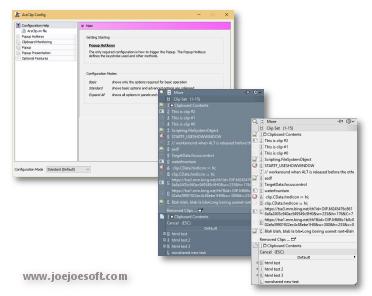
ArsClip used to be barebones, but I think I can safely say that it has become a nicely featured and highly configurable program, due to user feedback. The program now specializes in copy-and-paste automation tasks.
Delphi XE2 source code included
- Permanent Clips/Macros for copying and pasting automation
- Picture, RichText, File Copy, Unicode, HTML support
- Highly configurable
- Win7 Jumplist support
- Optional Clipboard Bar -- clipboard viewer
- Optional Global Clipboard to shares clips with other Windows and Android devices
This program requires no installation, but an optional setup program is included. Supported on Windows XP through Windows 10.
Changes in v5.04
[download replaced by above version]
New:(Popup)
- added Search Removed checkbox for Filter searches
- added keystrokes to execute commands using Shortcut Keys
New:(Permanent Clips/Macros)
- updated keystrokes to allow for repeat count
- added new options for the [COPY] command
- added option to ignore newlines for macros
- added double click support for Permanent Clips/Macros list
- added drag/drop support for Permanent Clips/Macros list
Fix:(Permanent Clips/Macros)
- issue importing a Permanent Clip
Fix:(Misc)
- database issue when saving a clip that is a large number
Changes in v5.00
[download replaced by above version]
EDIT: 5.01 fixes a Win7 issue and detecting UAC
EDIT: 5.02 fixes an issue with loading the SQLite3.dll file on some systems
New:(Edit Clips/Macros)
- combined Edit History and Permanent Clips into one window
- new tab for working with other clip databases
- replaced About / Help tab
New:(Configuration)
- added Clear button for plaintext hotkey
- added Global Clipboard options under Clipboard Monitoring
New:(Clipboard Monitor)
- added visual cues when clipboard is ignored
New:(Popup)
- added visual cues when "Clipboard Only" mode is active
New:(Misc)
- added automated compatibility for running from USB drive, remote folder, or local drive
- more checks for possible issues with protection programs and file permissions
Fix:(Permanent Clips/Macros)
- issue pasting using a Global Hotkey
Fix:(Popup)
- issue when clip list changes while popup is open
Fix:(Misc)
- date format issue with some regions
- rewritten Popup and Removed clip storage
- re-implemented MimicDelayMS ac.ini variable
- added MimicDelayMSEnabled ac.ini variable, default is false
Fix:(Tooltip)
- issue when clicking system tray tooltip
Fix:(Permanent Clips/Macros)
- issue when pasting a clip containing keystrokes
Changes in v4.21
[download replaced by above version]
Fix:(Search and Paste)
- deadlock when pasting a Removed clip
Fix:(Permanent Clips/Macros)
- Clipboard ignored after using [MIMIC] command
Fix:(Edit Clip)
- issue with trailing newline character
Fix:(Misc)
- experimental fix for multi-monitor issue
Changes in v4.20
[download replaced by above version]
New:(Clip Menu)
- reworked the visuals
- support for keyboard navigation
- support for macros using Custom Menus
New:(Configuration)
- new settings page [Popup>Clip Menu]
- added Custom Macro to Per-Program Options
- updated Keystrokes/Clicks information
- new 'Pin to taskbar' button under [Misc>Jumplist]
New:(Permanent Clips/Macros)
- improved interactions with external scripts and programs
- new 'Wait for New Clip' command
- new 'Clipboard to Textfile' command
- updated [RUN] command to include [ENDRUN]
- [RUN] now parses all literal text and insert commands
- updated [WINDOWSEARCH] to support [WINDOWSEARCH=""]
New:(Popup)
- added 'move clip' keystrokes
- added 'show Clip Menu' keystroke
Fix:(Popup)
- improved delete keystroke
- various issues with Keystroke / Clicks settings
- Tooltip Hint not defaulting to text over HTML code
- drawing issues with very large font sizes
- tall menu text not always vertically centered
- minor visual tweaks
Fix:(Permanent Clip/Macros)
- issue with Clipboard State command
Fix:(Debug)
- reworked the debug window
- old debug logs preserved
ANY USE BY YOU OF THE SOFTWARE IS AT YOUR OWN RISK. THE
SOFTWARE IS PROVIDED FOR USE "AS IS" WITHOUT WARRANTY OF
ANY KIND. TO THE MAXIMUM EXTENT PERMITTED BY LAW, THE
SOFTWARE'S CREATOR DISCLAIMS ALL WARRANTIES OF ANY
KIND, EITHER EXPRESS OR IMPLIED, INCLUDING, WITHOUT
LIMITATION, IMPLIED WARRANTIES OR CONDITIONS OF
MERCHANTABILITY AND FITNESS FOR A PARTICULAR PURPOSE.
THE SOFTWARE'S CREATOR IS NOT OBLIGATED TO PROVIDE
ANY UPDATES OR UPGRADES TO THE SOFTWARE. THE INCLUDED
PROGRAM AND SOURCE CODE MAY NOT BE MODIFIED AND DISTRIBUTED
FOR COMMERCIAL GAIN AS A NEW PRODUCT.