





 ArsClip ArsClip
|



|
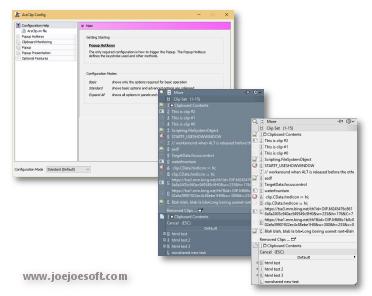
ArsClip used to be barebones, but I think I can safely say that it has become a nicely featured and highly configurable program, due to user feedback. The program now specializes in copy-and-paste automation tasks.
Delphi XE2 source code included
- Permanent Clips/Macros for copying and pasting automation
- Picture, RichText, File Copy, Unicode, HTML support
- Highly configurable
- Win7 Jumplist support
- Optional Clipboard Bar -- clipboard viewer
- Optional Global Clipboard to shares clips with other Windows and Android devices
This program requires no installation, but an optional setup program is included. Supported on Windows XP through Windows 10.
Changes in v5.30
Download acv530.zip
(Window: Configuration)
New: added "Search" button for locating settings
Fix: updates some descriptions to work better with new Search feature
(Window: Clipboard Bar)
New: updated the Permanent Clip menu to make clips using any found format
(Window: Edit Permanent Clip)
New: added JavaScript routines for Pinned/Popup Clips
New: added JavaScript routine for install path
New: added JavaScript clipboardHasFormat routine
New: added JavaScript routines for Window / Mouse manipulation
New: added JavaScript routine to get the title of a window
New: added [PROMPTOPTIONS] command for a list of items
New: added [PROMPTRESPONSE] command for repasting prompt input
New: added "Undo" to the right-click menu
New: editable Rich Text clips
New: "Clip Only Format" menu item
New: added helper panel for creating a new HTML Clip
New: added experimental HTML viewer
New: added "Get Clipboard As" command
New: JavaScript routines to show/write debug text
New: added JavaScript routines to maximize/minimize a window
New: added "File" menu for saving the current clip, includes shortcut keys
New: option to prevent clearing of clip preview result between runs
New: added shortcut key for running a macro/script
Fix: minor updates to the "Results / Run" panel
Fix: [Insert>Clipboard>Delete] created the wrong command
Fix: issue with some keystrokes not being sent
(Permanent Clips/Macros)
New: JavaScript errors now logged to debug log
New: tooltip hint removed for JavaScript clips executed by a global hotkey
Fix: possible clipboard error on the second call of a complex script
Fix: JavaScript error message not shown when Permanent Clip executed with global hotkey
Fix: issue with start_ac_macro/end_ac_macro labels and empty text between
(Misc)
New: updated initial database error check to detect a locked file
Fix: optimized shared permanent clips to write less data to shared.ini file
(Clipboard Monitor)
Fix: issue getting display text for HTML clips
(Window: Permanent Clips/Macros)
Fix: Highlight missing when "Edit" selected from right-click menu
Changes in v5.29
[download replaced by above version]
(Permanent Clips/Macros)
New: Support for literal double quote characters in Commands that support data
Fix: saveToPopupClips("") JavaScript function changed to support text with double quotes
Fix: [PASTEDEFAULT] not working
(Window: Edit Clips/History)
Fix: improved load speed of Permanent Groups in the window
(Window: Configuration)
Fix: Permanent Clips not using the "Formatted Only" setting under Popup > Behavior
(Windows: Permanent Clips/Macros)
New: Updated Command Reference to use a clickable control
Fix: Quoted data treated as lowercase (caused in previous test version)
Changes in v5.28
[download replaced by above version]
(Window: Configuration)
New: increased the maximum for Popup Clips
Fix: Drag-Drop issue with Custom Menus list
Fix: Custom modifier key action not working with "Destroy"
(Window: Edit Clips/Macros)
New: added default help text about macro references
New: added Edit Group popup menu
New: updated Permanent Clips lists to support multiselect for deleting/moving clips
Fix: drag-drop reordering udpated for multiselect for Permanent Clips
Fix: "Copy" not setting clipboard for Removed Clips
(Window: Edit Permanent Clip)
New: PINNEDITEM command added (Insert Commands > Insert)
New: CLIPBOARDFROMFILE added (Insert Commands > Edit Clipboard)
New: added "Convert Clip to Plaintext" on right click menu (when plaintext version available)
New: updated description when formatted clip is Read-Only
(Window: Popup)
Fix: issue exiting program when Pinned to Desktop
(Window: Clip Menu)
Fix: delete/destroy not working for Pinned Clips
(Misc)
Fix: possible issue with large number of global hotkeys
Fix: issue grabbing clipboard contents after certain Macro commands
Fix: corrected group indexing - defaulting to alphabetical
Changes in v5.27
Download acv527.zip
(Window: Clip Menu)
Fix: Edit not working on Pinned clips
(Window: Edit Permanent Clip)
Fix: Edit Clipboard menu items not functioning when clicked
(Window: Popup)
Fix: issue showing Tooltip Hint for removed clips when using Filter search mode
(Misc)
Fix: workaround for newline character and mimic typing not working for some programs
Fix: another issue with global hotkeys
Fix: issue setting and clearing global hotkeys
ANY USE BY YOU OF THE SOFTWARE IS AT YOUR OWN RISK. THE
SOFTWARE IS PROVIDED FOR USE "AS IS" WITHOUT WARRANTY OF
ANY KIND. TO THE MAXIMUM EXTENT PERMITTED BY LAW, THE
SOFTWARE'S CREATOR DISCLAIMS ALL WARRANTIES OF ANY
KIND, EITHER EXPRESS OR IMPLIED, INCLUDING, WITHOUT
LIMITATION, IMPLIED WARRANTIES OR CONDITIONS OF
MERCHANTABILITY AND FITNESS FOR A PARTICULAR PURPOSE.
THE SOFTWARE'S CREATOR IS NOT OBLIGATED TO PROVIDE
ANY UPDATES OR UPGRADES TO THE SOFTWARE. THE INCLUDED
PROGRAM AND SOURCE CODE MAY NOT BE MODIFIED AND DISTRIBUTED
FOR COMMERCIAL GAIN AS A NEW PRODUCT.