





 ArsClip ArsClip
|



|
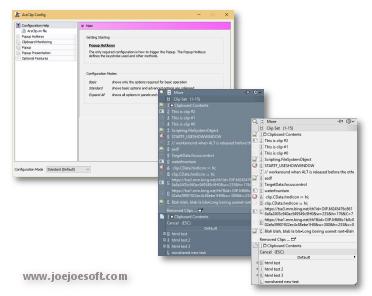
ArsClip used to be barebones, but I think I can safely say that it has become a nicely featured and highly configurable program, due to user feedback. The program now specializes in copy-and-paste automation tasks.
Delphi XE2 source code included
- Permanent Clips/Macros for copying and pasting automation
- Picture, RichText, File Copy, Unicode, HTML support
- Highly configurable
- Win7 Jumplist support
- Optional Clipboard Bar -- clipboard viewer
- Optional Global Clipboard to shares clips with other Windows and Android devices
This program requires no installation, but an optional setup program is included. Supported on Windows XP through Windows 10.
Changes in v3.1.1
New: Marker for the current text item on the clipboard
New: Experimental 'Clipboard Bar' system tray menu option
New: Option to set the smallest popup item height in pixels - default 16
New: Icons scaled to fit popup item height
New: Configuration option to disable the 'Copy Selected' operation for non-standard text controls [enabled by default]
Fix: Images copied in Internet Explorer detected as HTML instead of pictures
Fix: Tweaks for the colors on Win2K systems
Fix: Tweaks for Win2K and XP with basic theme
Fix: Rendering of 'System' item and checkboxes update on the popup
Fix: Tweaks to the left column and tooltip header colors to be more compatible with different OSes
Fix: Tooltip shown on tray icon click covered up the icon - interfering with further clicking
Fix: Current Permanent Items doesn't need to be shown in Full Mode, when configured not shown
Fix: "Last:" item doesn't need to be shown in Full Mode when empty
Fix: Tweaks to the 'Edit Selected' item to be more responsive and eliminate possible freezing
Fix: Duplicate line separators sometimes shown
Fix: 'Edit Selected' disabled for the desktop
Fix: 'Mimic Type' setting in Program Options menu item not working
Fix: The "Save to" group option only worked for existing items, not new items.
Changes in v3.1.0
(Note: Original Release had a problem saving permanent items, 310b fixes that problem)
New: XP/Vista Theme Support
New: Updated look for the main popup and the system tray icon popup
New: Option to replace new formatted text clipboard items with plain text
New: "Edit Clipboard" sytem tray icon command
New: "Edit Selected" popup menu item
New: "Move to" right-click option for items on the Permanent Items window
New: Permanent Item edit window now has an option for saving the item to another group
New: Current Clipboard item shown when the system tray icon is clicked
New: Popup hotkey shown on tooltip when system tray icon hovered
New: Option to use a case sensative text item list
New: Included Removed Items in the "Move to first" when selected option
New: Option to show the Edit Item window instead of the popup when highlighted items are detected
New: Pressing Tab simulates pressing the cliptype icon on the main popup
New: "Application" keyboard key can be used instead of a right-click on menu items
Fix: Crash creating a permanent item when no default group exist
Fix: Ctrl+Click configuration option not loaded correctly
Fix: Improved the display speed of the tooltip when the item contains a very large amount of text
Fix: [Program Options->Shift+Insert] setting was not working
Fix: "Current" Permanent Group missing from popup under some configurations
Fix: Some Configuration items re-worded and re-organized
Fix: Hotkey was not being show on system tray's tooltip when "flashing" the icon setting disabled
Fix: Permanent Item name wasn't set when editing certain types of clips
Changes in v3.0.3
New: Permanent Items edit window
New: added Help/About tab to Permanent Items
Fix: "All Items" not shown when no Permanent Items exist
Fix: Empty permanent item groups not shown
Changes in v3.0.2
New: "Flush Clipboard" system tray command
Fix: "Switch To" configuration option not loaded
Fix: -data command fix for 2 files
Fix: Edit window "sticking" when accelerator keys used on popup
Fix: "Maximum width" not loaded on restart
Fix: Broken chain detected, but not corrected
ANY USE BY YOU OF THE SOFTWARE IS AT YOUR OWN RISK. THE
SOFTWARE IS PROVIDED FOR USE "AS IS" WITHOUT WARRANTY OF
ANY KIND. TO THE MAXIMUM EXTENT PERMITTED BY LAW, THE
SOFTWARE'S CREATOR DISCLAIMS ALL WARRANTIES OF ANY
KIND, EITHER EXPRESS OR IMPLIED, INCLUDING, WITHOUT
LIMITATION, IMPLIED WARRANTIES OR CONDITIONS OF
MERCHANTABILITY AND FITNESS FOR A PARTICULAR PURPOSE.
THE SOFTWARE'S CREATOR IS NOT OBLIGATED TO PROVIDE
ANY UPDATES OR UPGRADES TO THE SOFTWARE. THE INCLUDED
PROGRAM AND SOURCE CODE MAY NOT BE MODIFIED AND DISTRIBUTED
FOR COMMERCIAL GAIN AS A NEW PRODUCT.