





 ArsClip ArsClip
|



|
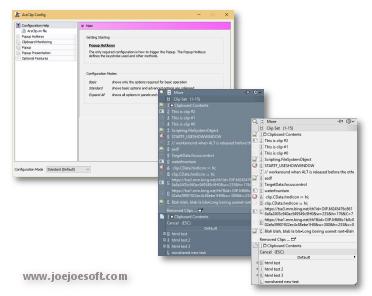
ArsClip used to be barebones, but I think I can safely say that it has become a nicely featured and highly configurable program, due to user feedback. The program now specializes in copy-and-paste automation tasks.
Delphi XE2 source code included
- Permanent Clips/Macros for copying and pasting automation
- Picture, RichText, File Copy, Unicode, HTML support
- Highly configurable
- Win7 Jumplist support
- Optional Clipboard Bar -- clipboard viewer
- Optional Global Clipboard to shares clips with other Windows and Android devices
This program requires no installation, but an optional setup program is included. Supported on Windows XP through Windows 10.
Changes in 3.1.5
[download replaced by above version]
New: Option to disable the default search word under Show Options
Fix: Removed "Integer Overflow" error message prompt, shown when some lists are empty
Fix: Full Mode now added by default when entire popup is blank
Fix: Column Break was accidentally shown in Full Mode
Fix: Search window pasting was destructive to selected text in target program
Fix: Keystrokes commands on Search window result could cause a crash when list was empty
Fix: Undelete sometimes shown instead of Remove on right-click context menu
Fix: "`" hotkey not triggering Full/Configured item on popup
Fix: Show Order window display problem
Fix: Using Switch from system tray was not saved for current foreground window
Fix: Previous Unicode test fix broke case sensitive configuration option
Fix: Text Item display issue when the only item shown on the popup
Fix: Various fixes to Removed Clips window
Fix: Tooltip Popup after a flush could access missing item
Fix: Workaround for disappearing controls when Alt is pressed
Changes in v3.1.4
[download replace by above version]
New: Jump List support for Windows 7
New: Icon's re-vamped
New: POPUPITEM command in Permanent Items
New: Updated URL fix code to encode spaces for a legal URL
Fix: "replace formatted text with plaintext" option caused a crash
Fix: Clipboard Bar state saved
Fix: Unicode text sometimes falsely detected as duplicate
Fix: Right-Click hold trigger ignored when the mouse is moving [for drag operations]
Fix: Reworded clips to use the word "clip" instead of "item"
Fix: Right-Click on a Permanent Clip on the popup caused an error message
Fix: Mimic Typing speed increased
Fix: Search didn't wait until typings stopped before searching
Fix: The "undelete" item missing from the Recently Removed Clip's right click menu
Fix: Small tweaks to the system tray's menu
Fix: Removed unused "Refresh" system tray item for Vista or above systems
Changes in v3.1.3
[download replace by above version]
New: Option to keep non-text items in a separate list
- Duplicate non-text clips now detected
New: Holding the right mouse button displays the popup
- RightClickDelay variable added to the ArsClip.ini text config file [defaults 600 milliseconds (0.6 seconds)]
- Added new "Program Options" setting to disable the right-click trigger for individual programs.
New: "Paste Selected" will combine and paste items as Unicode (when supported)
- Unicode text now displayed in "Paste Selected" dialog
New: "(Column Break)" item added to Show Order options
(EDIT)Fix: Display warning message if files data cannot be created
Fix: Workaround for crash when system tray icon triggered and display driver reset
- "OldTrayPopup" configuration option added to ArsClip.ini text file
Fix: Permanent Item global hotkeys incorrectly triggered by other programs/hardware
Fix: Errors when copying large, complex items [from programs like Excel]
Fix: Problem with Text Items format configuration
Fix: "Replace formatted text with plaintext" would alter some non-text items, like file copies.
Fix: Some data left on Edit History dialog after "Flush Everything"
Fix: Optional setup program updated
Fix: Minor GUI fixes for the configuration window
Fix: Missing tooltip for Recently Clicked items
Fix: Mimic Typing now works with AltGr generated characters
Fix: Some global hotkeys incorrectly triggered by other programs/hardware
Fix: "Clear" hotkey button not working for editing a Permanent Item
Changes in v3.1.2
New: "Search" popup item
New: Recently Clicked popup submenu item [only shown when not empty]
New: Full/Configured Icon open "Show Order" configuration window
New: "Edit Permanent Items" added to submenu of All Items submenu and Switch To submenu
New: Edit button show on Popup for currently highlighted Permanent Item
New: Sound Enable is now a configuration item (requires registry write when enabled)
Fix: "Make Permanent" failed on the very first run
Fix: New popup menu items don't require a reset of the Show Order user configuration options
Fix: Clipboard Watcher causing constant monitoring refreshing
Fix: Shortcut key for "Last" is now reserved even when not currently shown
Fix: Using the Windows Key as hotkey could cause other hotkeys to execute
Fix: "Permission denied" message incorrectly shown for programs with no text fields
Fix: Dragged Permanent Items with keystrokes problem
Fix: "All Items" was not displayed if last group was empty
Fix: Menu item renamed to "Permanent Groups"
Fix: Right-Click on Non-text Items was not working
ANY USE BY YOU OF THE SOFTWARE IS AT YOUR OWN RISK. THE
SOFTWARE IS PROVIDED FOR USE "AS IS" WITHOUT WARRANTY OF
ANY KIND. TO THE MAXIMUM EXTENT PERMITTED BY LAW, THE
SOFTWARE'S CREATOR DISCLAIMS ALL WARRANTIES OF ANY
KIND, EITHER EXPRESS OR IMPLIED, INCLUDING, WITHOUT
LIMITATION, IMPLIED WARRANTIES OR CONDITIONS OF
MERCHANTABILITY AND FITNESS FOR A PARTICULAR PURPOSE.
THE SOFTWARE'S CREATOR IS NOT OBLIGATED TO PROVIDE
ANY UPDATES OR UPGRADES TO THE SOFTWARE. THE INCLUDED
PROGRAM AND SOURCE CODE MAY NOT BE MODIFIED AND DISTRIBUTED
FOR COMMERCIAL GAIN AS A NEW PRODUCT.