





 ArsClip ArsClip
|



|
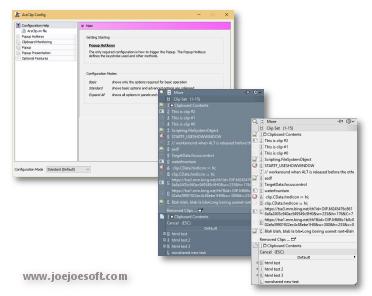
ArsClip used to be barebones, but I think I can safely say that it has become a nicely featured and highly configurable program, due to user feedback. The program now specializes in copy-and-paste automation tasks.
Delphi XE2 source code included
- Permanent Clips/Macros for copying and pasting automation
- Picture, RichText, File Copy, Unicode, HTML support
- Highly configurable
- Win7 Jumplist support
- Optional Clipboard Bar -- clipboard viewer
- Optional Global Clipboard to shares clips with other Windows and Android devices
This program requires no installation, but an optional setup program is included. Supported on Windows XP through Windows 10.
Changes in v3.2.2
New: Improved Permanent Clips edit window
- new Commands added
- new 'Custom Key Combination' option added to Keystrokes
- added example Keystroke and Command items
- new right-click menu options for the Clip to Paste
New: Improved Permanent Clips and Groups window
- new icons to show types of clips
- added a confirmation to the delete command
- fixed selection issues
- cosmetic changes
- clip re-selected after an edit
New: Minor changes existing settings in the Configuration window
- updated [Clipboard>Text Clips]
- updated [Clipboard>Non-Text Clips]
- updated [Popup>Show Options]
- [Popup>Show Options] setting to toggle between using program icons and an icon for the type of clip
New: Improved Edit History/Removed Clips window
- option to export clips to normal Text/RichText/Picture files
Fix: External Edit results now saved to popup
Fix: Clips with keystrokes updated to prevent conflicts
Fix: New clips ignored while External Editor program is editing a clip
Fix: Edit History slow to update after editing a clip
Fix: Program was stopped while until sound stopped playing
Fix: Search window not pasting pictures
Fix: Search window memory leak
Changes in v3.2.1
[download replaced by above version]
New: Revamped Edit History/Removed Clips window
- added RichText preview support
- changed clip display format
- combined Edit History and Recently Removed windows into one
- added a Configuration button
New: Revamped Search window
- improved positioning
- keystrokes labeled
- status messages correctly displayed while searching
New: Revamped Permanent Clip new/edit window
New: Created a new configuration category [Clipboard>History]
New: Created a new configuration category [Clipboard>Sound]
New: Sound options no longer require a registry write and are portable
Fix: Removed Items sometimes shown as empty
Fix: Changing the Removed Clips queue size could incorrectly remove clips
Fix: Fixed Find dialog issues under Removed Clips
Fix: Tweaks to the Tooltip Popup hotkeys
Fix: Sound not played if clip is the exact same as the last
Fix: UAC Admin detection added since ArsClip cannot paste directly into these programs
Fix: Old registry settings removed when sound option is disabled
Fix: Improved the External Editor routine
Changes in v3.2.0
New: Configuration window reworked and categorized
New: Default popup view simplified for new installs
New: User defined Shift+Select and Ctrl+Select keystroke configuration options
New: External Editor support for text and picture clips
New: Clip size shown on tooltip hint
New: Option to use Virtual Desktop for the Trigger Window
New: Tooltip Hint will grow to show larger clips when hovered for longer
Fix: Configuration displayed by default when second instance is run
Fix: Configuration screen not displayed in foreground in some instances
Fix: System menu on popup showed old icons
Fix: 'Current' popup menu item not cleared correctly
Fix: Tweaks and fixes to the Clipboard Bar window
Fix: 'Edit Selected' popup menu item was not always working in Full Mode
Fix: Wrong icon sometimes shown on Program Options popup menu item
Fix: Configuration window shown on taskbar when opened
Changes in 3.1.6
New: Trigger Window configuration option
New: Current popup history automatically saved every 10 minutes
New: 'Edit Clipboard' will now use your default text editor
New: Added an Edit Clipboard shortcut to the tooltip shown when left clicking the system tray icon
New: 'Destroy Item' added to right-click menu
Fix: Popup uses mouse position when target window doesn't correctly report the Caret position
Fix: Tweaked the Search window to try to reduce ignored keystrokes
Fix: Windows launched from Jumplist did not always appear in foreground
Fix: Workaround for popup menu position problems with maximized windows
Fix: Updated the CLIPBRD command to work with the RUN command in Permanent Clips
ANY USE BY YOU OF THE SOFTWARE IS AT YOUR OWN RISK. THE
SOFTWARE IS PROVIDED FOR USE "AS IS" WITHOUT WARRANTY OF
ANY KIND. TO THE MAXIMUM EXTENT PERMITTED BY LAW, THE
SOFTWARE'S CREATOR DISCLAIMS ALL WARRANTIES OF ANY
KIND, EITHER EXPRESS OR IMPLIED, INCLUDING, WITHOUT
LIMITATION, IMPLIED WARRANTIES OR CONDITIONS OF
MERCHANTABILITY AND FITNESS FOR A PARTICULAR PURPOSE.
THE SOFTWARE'S CREATOR IS NOT OBLIGATED TO PROVIDE
ANY UPDATES OR UPGRADES TO THE SOFTWARE. THE INCLUDED
PROGRAM AND SOURCE CODE MAY NOT BE MODIFIED AND DISTRIBUTED
FOR COMMERCIAL GAIN AS A NEW PRODUCT.