





 ArsClip ArsClip
|



|
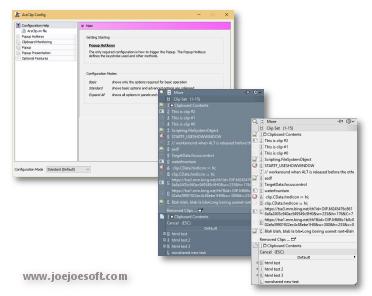
ArsClip used to be barebones, but I think I can safely say that it has become a nicely featured and highly configurable program, due to user feedback. The program now specializes in copy-and-paste automation tasks.
Delphi XE2 source code included
- Permanent Clips/Macros for copying and pasting automation
- Picture, RichText, File Copy, Unicode, HTML support
- Highly configurable
- Win7 Jumplist support
- Optional Clipboard Bar -- clipboard viewer
- Optional Global Clipboard to shares clips with other Windows and Android devices
This program requires no installation, but an optional setup program is included. Supported on Windows XP through Windows 10.
Changes in v4.3
[download replaced by above version]
New: Full Unicode support
New:(Tooltip Window)
- rewritten and redesigned
- improved behavior when shown on system tray icon
New:(Permanent Clips)
- updated WAIT command too allow custom millisecond values
- added new PROMPT command to allow for interactive data inserts
New:(Edit History/Removed Clips)
- icon now shown for type of clip
- improved loading speed
- added new icon scheme to speed up loading of clips
New:(Permanent Clips)
- added new Preview button for testing clips with keystrokes and commands
New:(Configuration)
- added new slider control for number input
New:(Configuration>Popup>Keystrokes)
- added 'Paste as Plaintext Only' keystroke option
- added keystrokes option to paste without closing the popup
New:(Configuration>Pasting)
- added option for pasting using Plain text and Formatted text
- added option for pasting using Formatted text only
- added option for pasting using Plain text only
New:(Misc)
- 'MimicDelayMS' setting added to arsclip.ini to slow down the keyboard mimic speed
Fix:(Popup)
- updated tooltip and popup positions on system tray
- tweaked the Right-Click popup trigger routine
- right-click trigger "Popup" tooltip missing
- autoscroll detection now works with keyboard navigation
- problems with autoscroll on multi-monitor setups with different offsets
Fix:(Permanent Clips)
- detection for && literal ampersand
- detection for TAB key in Custom Keystrokes
- value for PROMPT command used for all identical prompts
Fix:(Edit History)
- problem with Find button
Fix:(System Tray)
- updated the icon flashing routine for compatibility
Fix:(Search)
- clip search routine was broken
Fix:(Misc)
- error message may appear when using specific configuration settings
- error logging updated
Changes in v4.0.2
[download replaced by above version]
New:(Popup)
- popup now scrolled when larger than the screen height
- partial pictures clips displayed on Popup Clips
- added an Alt keypress function for accelerator keys to paste as formatted text
New:(Clipboard Bar)
- clip icon added to window for RichText, HTML, and Files
New:(Trigger Window)
- window is now dragable on the bottom-left corner
New:(Permanent Clips)
- added 'Place on Clipboard Only' Command
New: added 'snap to' behavior to the Trigger Window and Clipboard Bar
Fix(Popup)
- issue with unclickable submenus that are displayed below the main popup
- update to use the Virtual Desktop's top-left corner
- 'current clipboard' background was not always updated correctly
- problem with using Mimic Typing as a Ctrl+Click or Shift+Click keystroke
- display issue with ampersands (also on Clipboard Bar)
- highlight issues when using mouse position
- positioning issues after dragging the popup
- drag mark cosmetic issue
Fix:(Clip Menu)
- issue with position on certain multi-monitor configurations
Fix:(Tooltips)
- text size issue
- now uses the same font settings as the popup
- tab characters are displayed
- improved tooltip displaying of pictures
Fix:(Configuration)
- improved the Show Preview automation to trigger with other settings
Fix:(Trigger Window)
- improved hover detection
Changes in v4.0.1
[download replaced by above version]
New:(Clipboard Bar)
- completely redesigned window
- right-click popup menu added to Clipboard Bar
New:(Popup)
- bottom left corner used to drag the entire popup
- transparent popup in Form Mode
- tweaks to position when reported window locations are wrong
New:(Configuration)
- [Popup] option to disable accelerator keys
- [Popup] option to auto-collapse expandable menus when another is expanded
- [Popup] option to auto-expand expandable menus on hover
- [Popup>Tooltip Hint] option to change the display delay
- [Clipboard>Text Clip] option to ignore small text clips
- [Per-Program Options] button to manually add program names
New:(Clipboard) ignores clips that are all-whitespace
New:(tray icon) new tooltip shown when icon hovered
Fix:(Configuration)
- [Popup>Menu Order] fixed Show Preview font
- [Popup>Menu Order] removed Color option from Set Font dialog
Fix:(Popup)
- several issues fixed when using Form Mode
- minor cosmetic change to the highlight
- error when dragging in a blank area
- minor drag cosmetic issues
- 'Search ...' renamed to 'Search and Paste ...'
Fix:(Permanent Clips)
- issue when showing the Permanent Clip window using a Permanent Clip
- issues with the [RUN] command, web addresses, and [CLIPBRD] with special characters
Fix:(Paste Selected) issues when using keyboard selection
Fix:(Edit History) cosmetic issues for picture clips
Changes in v4.0.0
[download replaced by above version]
New: (Popup) completely redesigned popup window
- Expandable Menus
- new Clip Menu window for editing clips
- drag-and-drop reordering
- Menu key/Application key and Delete key support
- whitespace is replace with symbols for clip captions
- improved the default starting state for a new installation
- accelerator key duplicates prevented
- optional double-height Popup Clip menus
New:(Configuration)
- updated items relating to the new popup
- removed no longer needed options
- (Popup>Menu Order) some menus renamed
- (Popup>Menu Order) - 'Show Preview' button to visualize any changes
- (Popup>Show Options) added a Double Height option
- (Popup>Show Options) option to disable empty menu items instead of hiding them
New:(arsclip.ini file) new section for accelerator keys
New:(Paste Selected Text) window reworked
Fix:(Search)
- cosmetic changes
- Permanent Clip captions not always correct
- timing issues when closing the window
- typing sometimes didn't trigger a search
- error if exited with no items found
- memory leak if Removed Clips found in search results
- bell/beep when Escape pressed
Fix: (Configuration)
- (Popup>Removed Clips) up/down control not working
- (Per-Program Options) icon now only shown for when default settings are changed
Fix: (Removed Clips) issue if size is set to zero
Fix: (Clip Menu) visibility issues
ANY USE BY YOU OF THE SOFTWARE IS AT YOUR OWN RISK. THE
SOFTWARE IS PROVIDED FOR USE "AS IS" WITHOUT WARRANTY OF
ANY KIND. TO THE MAXIMUM EXTENT PERMITTED BY LAW, THE
SOFTWARE'S CREATOR DISCLAIMS ALL WARRANTIES OF ANY
KIND, EITHER EXPRESS OR IMPLIED, INCLUDING, WITHOUT
LIMITATION, IMPLIED WARRANTIES OR CONDITIONS OF
MERCHANTABILITY AND FITNESS FOR A PARTICULAR PURPOSE.
THE SOFTWARE'S CREATOR IS NOT OBLIGATED TO PROVIDE
ANY UPDATES OR UPGRADES TO THE SOFTWARE. THE INCLUDED
PROGRAM AND SOURCE CODE MAY NOT BE MODIFIED AND DISTRIBUTED
FOR COMMERCIAL GAIN AS A NEW PRODUCT.