





 ArsClip ArsClip
|



|
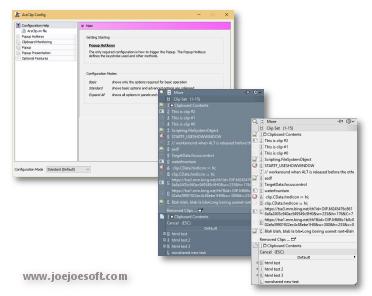
ArsClip used to be barebones, but I think I can safely say that it has become a nicely featured and highly configurable program, due to user feedback. The program now specializes in copy-and-paste automation tasks.
Delphi XE2 source code included
- Permanent Clips/Macros for copying and pasting automation
- Picture, RichText, File Copy, Unicode, HTML support
- Highly configurable
- Win7 Jumplist support
- Optional Clipboard Bar -- clipboard viewer
- Optional Global Clipboard to shares clips with other Windows and Android devices
This program requires no installation, but an optional setup program is included. Supported on Windows XP through Windows 10.
Changes in v4.7
[download replaced by above version]
Fix:(Popup)
- clip icons issue
NOTE: Existing clips made with 4.6 will not have the correct icon.
Changes in v4.6
[download replaced by above version]
New:(Configuration)
- option for middle mouse button click actions
- Popup color options
New:(Clip Item Menu)
- new [Paste ... > As File] option
New:(Permanent Clips)
- Command to delete a PopupClip
New:(Misc)
- arsclip.ini option TXTProgram for specifying editing program
- arsclip.ini option BMPProgram for specifying editing program
Fix:(Popup)
- updated All Permanent methods for displaying 'switch' menus
- pinned items not detected as current clip after unpinning
- issue with [System>Flush] separator line
- unpinned items return after a program restart
Fix:(Permanant Clip Edit)
- right-click menu updated to replace any type of current clip
Fix:(Edit History)
- issue with exporting RichText clips
Fix:(Tooltip Hint)
- updated to show hotkeys for permanent clips
Fix:(Permanent Clips)
- issue when re-saving formatted or non-text clips
Fix:(Misc)
- two memory leaks associated with Tooltip on system tray
Changes in v4.5
[download replaced by above version]
New:(Popup)
- Popup Clips can now be pinned to the popup
New:(Clip Menu)
- updated visuals
- added support for pinned clips
New:(About Window)
- added button to check for new versions
New:(Configuration>Clipboard>Non-Text)
- Option to use Picture clip when both a Picture and Text clip are detected
Fix:(Popup)
- issues pasting pictures
- 'Edit Clip' routine not working on WinXP
- popup somtimes closing when using the Alt key for a hotkey
- WinXP submenu display issue
- issue displaying empty submenus
Fix:(Clip Menu)
- minor visual changes
Fix:(Permanent Clips Window)
- minor visual changes
Fix:(Misc)
- intermittent issue when loading the program on a stressed system
Changes in v4.4
[download replaced by above version]
New:(Permanent Clips)
- command to Find and Replace text on the clipboard
- command to disable monitoring when running a clip
Fix:(Permanent Clips)
- issue with HTML Clips
- reworked keystrokes and commands
- issue with the RUN command and the '[' character
- fixed minor issues with preview window
Fix:(Popup)
- several "List index out of bounds" errors corrected
Fix:(Edit History)
- memory leak when switching tabs
Fix:(Tooltip Hint)
- issue displaying very large text clips
Fix:(Removed Clips)
- error could be caused when starting the program
Fix:(Misc)
- hotkey may stop responding on some systems
- icon cache improvements and fixes
- updated the debug logging
ANY USE BY YOU OF THE SOFTWARE IS AT YOUR OWN RISK. THE
SOFTWARE IS PROVIDED FOR USE "AS IS" WITHOUT WARRANTY OF
ANY KIND. TO THE MAXIMUM EXTENT PERMITTED BY LAW, THE
SOFTWARE'S CREATOR DISCLAIMS ALL WARRANTIES OF ANY
KIND, EITHER EXPRESS OR IMPLIED, INCLUDING, WITHOUT
LIMITATION, IMPLIED WARRANTIES OR CONDITIONS OF
MERCHANTABILITY AND FITNESS FOR A PARTICULAR PURPOSE.
THE SOFTWARE'S CREATOR IS NOT OBLIGATED TO PROVIDE
ANY UPDATES OR UPGRADES TO THE SOFTWARE. THE INCLUDED
PROGRAM AND SOURCE CODE MAY NOT BE MODIFIED AND DISTRIBUTED
FOR COMMERCIAL GAIN AS A NEW PRODUCT.