




 Rename Master Rename Master
|



|
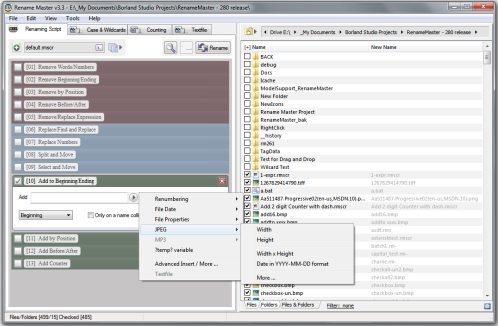
This utility will add, remove, or replace parts of the filename with ease and also supports renaming via file properties, MP3 tags, JPEG JFIF and EXIF tags, Video tags, and text files. Batch renaming that's simple to use, yet still very powerful.
Delphi XE2 source code included (v3.18 and above)
- Intelligent number sorting
- Full Unicode filename support
- File and folder renaming
- Custom filelist columns
- Auto-Preview
- Subfolder Scanning to rename files in multiple folder
- Renaming Variables for JPEG/MP3/Video tags, file properties, counters, and more
- Scripts to save commonly used renaming options
- [*] and [?] command prompt style wildcards, or full Regular Expression support
- Optional Explorer integration for right-clicking on files/folders or using "Send To"
- Case Changing and Textfile importing
- Command line options for batch renaming
Changes in 2.7.4
Fix: AutoWidth column size setting problems
Fix: Shortcut (.lnk) files icon incorrect
Fix: More errors found with [Add 2] and regular expressions/wildcards
Fix: Browse panel folder list display problems when resized
Fix: Failed find search string when first letter is duplicated (example: "readme" not found in filename "rreadme")
Fix: Parent Folder meta-variable problems
Changes in 2.7.3
Fix: command-line script execution still not working
Fix: Autopreview and full regular expressions break for [Add 2] renaming options
New: Highlight Collisions menu command
New: Parent Folder meta-variable "?pf?"
Changes in 2.7.2
New: configuration option for full Regular Expressions
Fix: minor auto-preview fixes
Fix: minor focus problem with up/down arrows on Thumbnail Preview window
Changes in v2.7.1
Fix: Auto Width column size not working
Fix: Collisions not shown in bold in some cases
Fix: Columns not reset when toggling Folder Browser
Fix: Default script not triggering auto-preview
Fix: Some script option fail to load if tab is not active
New: Column Size menu changed to [Auto Width, Full Width, User Set Width]
New: Filename Collision color configuration option (red by default)
New: Exclude Files now accepts wildcards
New: Exclude Now menu item
New: Top/Bottom buttons added to Floating Thumbnail window
New: Improved update speed for toggling thumnail list
New: Improved update speed for Folder Browser
New: Disable icon cache configuration option
New: Collision count in status field
New: Tab name flagged when options set (to show tabs with changes)
New: Collapse All button on Folder Browser
New: Renaming options checkboxes automatically focuses textbox
Changes in previous versions
Changes in v2.7.0
Fix: Folders removed from view durring recursive scan
- also provides speed increase
Fix: Pressing Enter durring a manual folder rename changed folders instead of renaming
Fix: Check/Uncheck by wildcard fails on recursive file list
Fix: Error 103 while renaming a Read-Only file
Fix: Undo operation ignored folder names
Fix: Empty "move it before" field causes error message
New: Completely rewritten File List
- offers massive speed increases for display thousands of files and previews
New: Double-clicking a file shows the floating thubnnail window
New: Only the filename shown in the NewName column (durring recursive scan)
New: Menubar shortcuts saved to [menu.ini] text file for customization
New: Cancel button shown durring recursive scan
- removed recursive scan info message box
New: Status bar shown durring preview
New: Thumbnail window dismissed when Escape pressed (or the hotkey pressed)
New: Thumbnail window buttons wrap and the size is saved on exit
New: Remove option to removed everything but a substring
New: Formatting options 'Substring' and 'Numbers to Letters'
New: Configuration option to not show hidden files
New: "My Documents", "My Pictures" and custom folders added to Folder Browser Panel
New: Updated look and buttons for Folder Browser Panel
New: Option to redisplay recursive list after renaming button pressed
New: Exclude Files window
Changes in v2.6.2
Fix: non-stop flicker when redrawing certain file icons
Changes in v2.6.1
Fix: Ins and Del shortcut keys interfere with textbox editing
Fix: Files with no extensions incorrectly flagged as changed
Fix: Icon cache interferes with Renaming Folders
Fix: File Path dropdown sometimes shifts position
Fix: Speed increase for displaying large file lists (up to 3000 items)
New: Minor changes to default interface
New: Parent folder added to File Path dropdown
New: Improved status reporting refreshing and previewing large lists
Changes in v2.6.0
Fix: More command-line parameters problems
Fix: Error message sometimes displayed when "starting counting at 0" set
Fix: Error message when typing quickly in Filter textbox
Fix: Error message when rapidly pressing ESC or F5
Fix: Auto-preview firing twice
New: Icon caching for 'thumbnail list' mode - speed increase durring a refresh
New: MP3 tags shown on Thumbnail Preview window
New: Custom Color configuration options for main window
New: Updated interface
- new Menu Bar with shortcut keys for many operations
- cleaner interface / less buttons on main form
- old interface toggleable
Changes in v2.5.1
Fix: Command-line parameters not working as expected with quoted values
Fix: Thumbnail preview window ignoring a picture an invalid file selection
Fix: Improved workaround for illegal EXIF date formats
Changes in v2.5.0
Fix: Pressing the "Move Up" button repeatedly crashes the program
New: Checkbox to show thumbnails in the file list (finally!)
New: Thumbnail Preview window updated with Preview/Next file buttons
New: Thumbnail Preview window updated with current file name
New: Thumbnail Preview window shows JPEG/EXIF tags
New: Unchanged names shown in grey instead of ghosting the icon
New: Collisions names shown in a bold font
New: Folder Properties button in the file path area
New: Alternating background colors for rows in the filelist
New: Full row selection, when any column but Name is clicked
New: Hotkeys for buttons like Clear and Preview
Changes in v2.4.6
Fix: Date Created time not updated for current timezone
Fix: "Range Check Error" produced for some JPEG EXIF data
Fix: Workaround for illegal EXIF date formats
Fix: "Capitalize Words" updated to handle all capitalized names
New: "Find and insert after" update to also insert "before"
New: Ability to find and move string in the Add2 tab
Changes in v2.4.5
Fix: Filter did not replicate command prompt behavoir for [*.] and [*.*]
Fix: Numeric sort breaks on a solitary zero
New: Invert Selection button
New: Find and Insert After renaming option
New: Remove "word list" option
New: files not changed are "ghosted" in the file list
Changes in v2.4.4
New: Intelligent sorting by numbers in filenames
New: Data column renamed to Date Modified or Date Created
New: Modified and Created date Meta-Variables
New: Filename collision reduction
New: 'Select Only' wildcard filter option
New: Improved Auto-Preview
New: Program's window reused instead of a new instance
New: Massive speed increase for detection collisions on thousands of files
New: Speed increase for recursvive scan
Fix: Open Maximized setting wasn't working correctly
Fix: Caplitalize Words broke for non-english words
Changes in v2.4.3
New: Extract JPEG EXIF date button for the file list
New: "Case" configuration options added to renaming options / saved in scripts
New: "Sentence case" option for renaming options
New: Quick-Load script popup
New: Hexidecimal Meta-Variable formatting
New: Draging files near top/bottom will auto-scroll the file list
Changes in v2.4.2
Fix: ".rm" always added to filename instead of ".rm-"
(Note: scripts will need to be renamed to be displayed in the "open" dialog)
Changes in v2.4.1
New: Drag-n-Drop selected items to move up or down in the list
New: Drag-n-Drop to change column order
New: Reset Filter and change File View buttons
New: "Save Filter in Script" option
New: Changed files re-checked after pressing Rename button
New: Script extension changed from ".RM" to ".RM-" to uniquely identify it
(Note: current scripts will need to be renamed to be visible in the "Open" dialog)
Fix: Thumbnail initialized with currently selected filed
Fix: In Auto-Preview mode, it activates when a new script is opened
Fix: "Increment By" not working with "Default.rm-" script
Fix: "Move to Top" button now always leaves folders listed first
Changes in v2.4.0
New: Thumbnail Preview window for JPG, JPEG, BMP, ICO, WMF, EMF files
New: Select/Clear using wildcards button
New: "Replace Single Characters" renaming option
New: Auto-Preview configuration option
New: Button to add RenameMaster to Explorer's "Send To" menu (in Configuration)
New: Show "File Created" date (instead of modified) option
New: Default.rm script automatically loaded at startup
New: Filename Meta-Variable
New: Files shown in the same selected order as Explorer when used with "Send To"
(NOTE: Explorer's order is inconsistant, so this option is experimental)
New: Scripts won't overwrite the "Filter" texbox if "txtFilter=" is set to blank
Changes in v2.3.9
Fix: "Current Folder" not working on Meta-Variable window
Fix: Blank fields (all spaces) in MP3 tags causes an error
New: Support for ASCII UserComment EXIF tag
New: "Open With ..." (or Send To) option in Explorer will auto-select multiple files in Rename Master
New: "Change to Folder in script on Open" option saved
Changes in v2.3.8
Fix: Floating point error message for some EXIF tags as zero
Fix: Some EXIF tags incorrectly diplayed as zero
Fix: Application not terminating when settings not saved on close
New: Automatic subfolder creation when "\" is used durring renaming (see the next 2 items)
New: Move files durring a rename when "\" is used in an Add or Replace renaming option
New: Create folders durring a rename when "\" is used in an Add or Replace renaming option
New: "Change to folder" script option saved in settings
New: Option to cancel a recursive (subfolder) scan
Changes in v2.3.7
Fix: Current Folder meta-variable not inserting
Changes in v2.3.6
New: Auto Preview for Meta-Variables formatting window
Changes in v2.3.5
Fix: Date formatting not working on "File Date" variables
New: CTRL+Q in textboxes to bring up the Quick Edit window
New: Insert Meta-Variables window stays open until you close it
Changes in v2.3.4
Fix: Large Font issues and forms controls not visible
Changes in v2.3.3
New: Batch mode command line switches - run without user interaction, return ERRORLEVEL 0 (no error) and 1(error)
"-xu script.rm" to execute and undo changes if an error occurs
"-xi script.rm" to execute and ignore errors
Changes in v2.3.2
Fix: Some folder icons not displaying
New: Formatting option for all meta-variables (on Insert form) - padding, decimal places, date formats
New: Resizable options panel
Changes in v2.3.1
Fix: Removed "icons.txt" debug file
Fix: EXIF tags can now be mixed with other tag types
Fix: Refreshing current folder when script folder not found
Fix: inserting First auto-selected meta-variable
New: updated default formats for some EXIF tags
New: EXIF tag finder
New: SHIFT+RightClick or FileMenu support for multiple files
New: Period subsitution configuration option
New: ESC dismisses meta-variables and config forms
New: SHIFT+A select all file only (folders are cleared)
Changes in v2.3.0
Fix: Error when using non-U.S. default number formats
Fix: Browser Pane changes even when "Don't Change to folder in Script" set
Fix: Browser Pane treeview not expanding on Win9x systems at startup
Fix: Minimize to desktop
New: MP3 ID3v1.x / stream, JPEG JFIF, and JPEG EXIF file tags support
New: Faster file list / Preview operations
New: Option to disable collision detection (for speed)
New: Option to save Browser Pane state
New: Cleaner Configuration/Meta-Variables forms
New: Actual file icons shown
New: Status Bar notification for show folder contents and previews
New: Save column sizing state (autosize or width of list)
New: Save Browser pane state (visible/not visible and size)
New: Unlocked "increment by" textfield
New: Long time format shown using Regional Settings format
Fix: Minimize form will minimize to taskbar instead of desktop
changes in v2.2.4
Fix: full dates not showing a time for 12:00 am
New: integrated show/hide browser pane
New: "changed" count in the status bar for previews
New: format the file size with commas
New: remove 2 option now can search and replace a substring
New: save column sizes option
New: file list font option
changes in v2.2.3
New: name collision detection/reporting
New: current folder meta-variable ?Cf?
New: dot added to "replace extension with" by default
Fix: leading/trailing spaces in scripts not saved
Fix: clear selections button broken in previous release
changes in v2.2.2
New: selected count in status bar
New: "clear" renaming options button
New: "remove 2" tab for renaming options
New: descending/ascending sorting for columns
Changes in v2.2.1
Fix: Scripts will always end in .RM
Fix: CTRL+C while editing a file name not copy only hilighted portion
New: Open maximized option
New: Path in title bar
New: File list shortcut keys
Enter = opens focused folder
ESC,Backspace = up one folder
F5 = refresh
CTRL+A = select & check all
CTRL+D = unselect & uncheck all
UP/DOWN arrows while editing selects next item to edit
New: File Menu button to show focused item's right-click menu
Changes in v2.2.0
Fix: "short dates" are now in the format defined by Regional Settings
Fix: Replace Extension with checkbox wasn't being saved in scripts
Fix: "Zero Padded" would ignore input typed directly in the textbox
Changes in v2.1.9
Fix: apostrophes are considered part of a word
New: "Replace 2" tab with more renaming options
New: About button on Config window
Changes in v2.1.8
Bug fix: "remove" would incorrectly remove an entire name or extension
Config Option: new Capitalize Words option
Changes in v2.1.7
- F2 key or slow double-click on a file to rename
- CTRL+C on a file to copy name to clipboard
Changes in v2.1.6
Updated sorting by name (for recursive scans)
New ?fc? meta-variable for total files per folder (for recursive scans)
New "Reset counter on new folder" option (for recursive scans)
- This makes a "01 of XX" type naming scheme possible durring recursive scans
- Example: (?n02? - ?fc?)
Changes in v2.1.5
When a renaming error occurs, option to "ignore errors" or to "stop and undo"
New Undo button (last rename only)
Changes in v2.1.4
Bug fix: Lockups durring removes
Changes in v2.1.2
New Refresh button
Double click on folder dropdown list activates dropdown
Update "Add to" options for inserting at a specified position
New script button for saving/loading the current folder, filter, and renaming settings
Minor bug fixes
Changes in v2.1.1
Preview name built into file list (see above snapshot)
New Column resize button
New "Move up" folder button
Changes in v2.1.0 and previous versions
Minor bug fixes (replace making filenames lowercase)
Option to use the standard Open dialog to select the current folder
Recursive Scan button (experimental)
Option to filter folders (just like the files)
Rename File/Folder/Files and Folders option
Option to [select/exclude] folders by default
Double Click on folder in file list changes the current folder
Updated configuration dialog
Option to disable Icons for Files/Folders
Bug fixes
- removed last character from files with no extension
- Folder Selection dialog crashed when last save folder was not found
- files sizes over 4 gigs shown incorrectly
Wildcards support (? and *) for replacing and removing
Better support for systems using Large Fonts
(Please uncheck the "Enable Large Fonts Mode" for best results on any system)
New ordering buttons for the file list
-move top, move up, move down, move bottom
New increment by option for file counting
Shift-Click and Ctrl-Click multiple file selection
Configuration option
- Show time and date of the files (usefull for numbering sequenced files)
New folder selection textbox
- support for user entered paths
- full long filenames
- keyboard navigation (ESC, and ENTER)
- UNC name support (\\server\share\)
Minor look/bug fixes
New Configuration options
- Remember window size
- Remember window position
- Uppercase, Lower case options
- "Large Fonts" mode
No installation needed, just put it where you want it
New Look
New explorer style folder selection menu
New Configuration options
- Remember last folder
- add to folder's right click menu (context menu)
- enable/disable new folder selection menu instead of old folder selection menu
ANY USE BY YOU OF THE SOFTWARE IS AT YOUR OWN RISK. THE
SOFTWARE IS PROVIDED FOR USE "AS IS" WITHOUT WARRANTY OF
ANY KIND. TO THE MAXIMUM EXTENT PERMITTED BY LAW, THE
SOFTWARE'S CREATOR DISCLAIMS ALL WARRANTIES OF ANY
KIND, EITHER EXPRESS OR IMPLIED, INCLUDING, WITHOUT
LIMITATION, IMPLIED WARRANTIES OR CONDITIONS OF
MERCHANTABILITY AND FITNESS FOR A PARTICULAR PURPOSE.
THE SOFTWARE'S CREATOR IS NOT OBLIGATED TO PROVIDE
ANY UPDATES OR UPGRADES TO THE SOFTWARE. THE INCLUDED
PROGRAM AND SOURCE CODE MAY NOT BE MODIFIED AND DISTRIBUTED
FOR COMMERCIAL GAIN AS A NEW PRODUCT.