




 Rename Master Rename Master
|



|
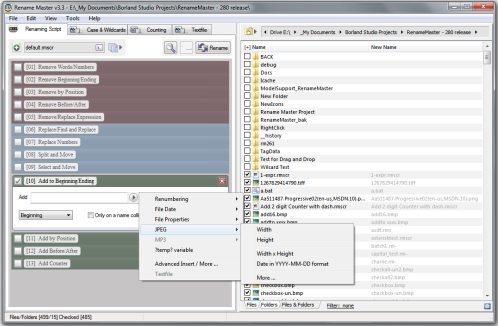
This utility will add, remove, or replace parts of the filename with ease and also supports renaming via file properties, MP3 tags, JPEG JFIF and EXIF tags, Video tags, and text files. Batch renaming that's simple to use, yet still very powerful.
Delphi XE2 source code included (v3.18 and above)
- Intelligent number sorting
- Full Unicode filename support
- File and folder renaming
- Custom filelist columns
- Auto-Preview
- Subfolder Scanning to rename files in multiple folder
- Renaming Variables for JPEG/MP3/Video tags, file properties, counters, and more
- Scripts to save commonly used renaming options
- [*] and [?] command prompt style wildcards, or full Regular Expression support
- Optional Explorer integration for right-clicking on files/folders or using "Send To"
- Case Changing and Textfile importing
- Command line options for batch renaming
Changes in v2.9.4
New: Step type Remove Expression added
New: Added some Example Scripts to the Zip file
Fix: Problem when using the date sorting option of a custom column
Fix: Problem when formatting an empty date
Fix: Formatting dates didn't work with some non-default regional settings
Fix: Changed "Remove Name/Phrase" to default to Phrase when first added
Fix: "View>Shown Items" setting not saved when changed
Fix: Folder Browser pane updated after a refresh to show new or deleted folders
Changes in v2.9.3
New: Add Counter Step
New: "Textfile" tab for loading data from text files
New: "Textfile" popup item for the Insert popup
New: Save Script dialog
New: Recursive scan command line options
Fix: Some meta-variables not highlighted when clicked
Fix: Removed duplicate/unused configuration/menubar items
Fix: Updated command line help
Fix: Default script didn't have all steps disabled by default
Fix: Added checks for permission to create files
Changes in v2.9.2
Fix: "Replace Characters" menu option created an incorrect "Remove Characters" step
Fix: Mousewheel support for scrolling the Scripting list updated
Fix: Various visual changes to the Scripting View
Fix: Workaround for files with special characters [sometimes Unicode]
Fix: "Remove Characters" reworded as "Remove Beginning/Ending"
Fix: Default script loaded for Scripting View
Fix: Replaces and Removes with empty text could cause errors
Fix: Updates to better support optional Right-Click Addon
New: "Remove Before/After" scripting step
New: Format Variable dialog
New: "Add All" option to add all steps
New: Cut,Copy,Paste,Delete,Format Variable right-click menu for text fields
New: Filter.ini file to customize the filter dropdown list
New: A single click highlights meta-variables in text fields
New: Optional Setup.exe program included
Changes in 2.9.1
Fix: updated the intelligent number sorting to work with very large numbers
Fix: running the new script format in batch mode didn't work
Fix: some script operations only partially saved
Fix: CTRL+A/D updated to be the same as using
File>Edit>Check/Uncheck
New: Enable/Disable button for each script step
New: added ?temp? variable option to Remove Characters/Substring options
Changes in 2.9.0
New: Scripting View interface toggle
New: [View -> Custom Columns], which are user created columns populated on a Preview
New: [View->Mini Rename Buttons] option
New: Date options for the insert popup menu.
New: Hotkey for the Rename button (CTRL+F6)
New: Added a Wildcard section to the Case tab
- scripts that require full regular expressions to work don't require a configuration change to execute
New: Added 'New Column ...' to column's right-click menu, to match Explorer's method of adding columns
Fix: Dropdown filepath problems
- problems when typing a Slash
- some items may show twice in the filepath
Fix: "Show Recursive List" prompt was continually shown after performing a rename on a recursive (subfolder scan) list of files
Fix: Spacebar toggled selection when manually typing a new filename
Fix: Right-Clicking an empty area of the filelist column shows the popup
ANY USE BY YOU OF THE SOFTWARE IS AT YOUR OWN RISK. THE
SOFTWARE IS PROVIDED FOR USE "AS IS" WITHOUT WARRANTY OF
ANY KIND. TO THE MAXIMUM EXTENT PERMITTED BY LAW, THE
SOFTWARE'S CREATOR DISCLAIMS ALL WARRANTIES OF ANY
KIND, EITHER EXPRESS OR IMPLIED, INCLUDING, WITHOUT
LIMITATION, IMPLIED WARRANTIES OR CONDITIONS OF
MERCHANTABILITY AND FITNESS FOR A PARTICULAR PURPOSE.
THE SOFTWARE'S CREATOR IS NOT OBLIGATED TO PROVIDE
ANY UPDATES OR UPGRADES TO THE SOFTWARE. THE INCLUDED
PROGRAM AND SOURCE CODE MAY NOT BE MODIFIED AND DISTRIBUTED
FOR COMMERCIAL GAIN AS A NEW PRODUCT.