




 Rename Master Rename Master
|



|
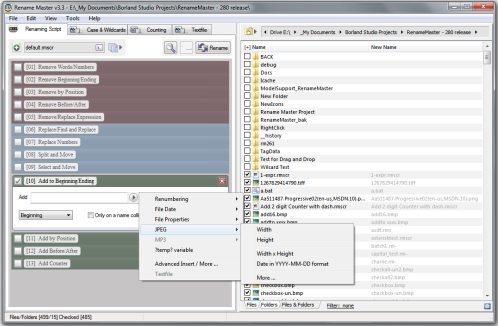
This utility will add, remove, or replace parts of the filename with ease and also supports renaming via file properties, MP3 tags, JPEG JFIF and EXIF tags, Video tags, and text files. Batch renaming that's simple to use, yet still very powerful.
Delphi XE2 source code included (v3.18 and above)
- Intelligent number sorting
- Full Unicode filename support
- File and folder renaming
- Custom filelist columns
- Auto-Preview
- Subfolder Scanning to rename files in multiple folder
- Renaming Variables for JPEG/MP3/Video tags, file properties, counters, and more
- Scripts to save commonly used renaming options
- [*] and [?] command prompt style wildcards, or full Regular Expression support
- Optional Explorer integration for right-clicking on files/folders or using "Send To"
- Case Changing and Textfile importing
- Command line options for batch renaming
Changes in v3.1
[download replaced by above version]
Fix:(Filelist)
- blank file names when using the "Send To" Explorer feature on a brand new install
- sort issues for some non-English Windows systems
- minor issue with Filter color
Fix:(Textfile)
- access error when choosing a textfile to load
Fix:(Renaming Script)
- EXIF date tag data not detected in JPEG files
Changes in v3.0
[download replaced by above version]
New: Unicode support
- added support for filenames, renaming operations, and scripts using Unicode characters
New:(Wide Layout Mode)
- new menu option [View>Toggle Wide Layout]
- Wide Layout is on by default for a new install
New:(Renaming Script)
- created a new 'Scripting Step Tools' button
- 'Help' button added to each scripting step
- Shift+Click on the Delete button will reset the current step
- (Replace Numbers Step) added option to replace numbers with a phrase
- added environment variable support
New:(Thumbnail Window)
- reworked the Thumbnail Window
- added support for GIF, TIFF and PNG graphics files
- added support for thumbnail TXT, INI, PDF, and some video files
- supports file opening and opening the File Tags window
New:(File Tags Window)
- support for Video files [AVI, MPG/MPEG, ASF/WMV, MOV/MP4/M4V]
- added width, height, and length tags for video formats
- added addition metadata tag support for some video file formats
- changed columns to 'Name', 'Tag', 'Contents'
New:(Configuration)
- added option to always show full Renaming Step descriptions
- added option for detecting empty/missing meta-variables
- added option for detecting Windows Environment Variables
- added option to always show step buttons
New:(Filelist)
- added 'illegal' filename detection for newname column
- rewrote filelist highlighting code
- added TIFF GIF PNG support in Large Thumbnail view
New:(Tools Menu)
- added Highlight Illegal menu item
New:(Folder Tools)
- add Files/Folders option
New:(File Path)
- updated breadcrumb control cosmetics
Fix:(Renaming Script)
- 'Add at Position' issue addressed
- color changes for the Expand/Collapse buttons
- minor changes to Remove Expression step
- renamed 'Replace Phrase' step to 'Find and Replace'
- error when enabling 'Remove Expression' with no options checked
- workaround for illegal EXIF values
Fix:(File List)
- improved speed of 'Preview' when working with large file sets
- Large Thumbnail View not refreshed correctly on program start
- workaround for files on shares that have missing timestamps
- 'Integer Overflow' when scanning empty MP3 files
- updated the right-click menu to support videos
Fix:(File Path)
- made more functional even when small
- various minor fixes
Fix:(Configuration)
- toolbar setting now saved on exit
- tweaks to color settings
Fix:(Filter)
- increased the delay before activating auto-preview
Fix:(Excluded Files)
- file selection refreshed on close
Fix:(Split and Move)
- issue with Auto-Gen sometimes leaving a trailing space
Changes in v2.9.7
New:(Renaming Script)
- drag-and-drop reordering
- new 'Split and Move' renaming step, designed for similarly named file groups
- [Skip/Execute] step updated with new options
- [Skip/Execute] step now indents affected steps
- [Remove Expression] new option added to this step
- steps now show line numbers
- button add for clearing only disabled steps or all steps
- updated the 'Insert' popup menu
- highlighted variables can now be clicked on and manually edited
New(Configuration>Renaming Script)
- option to disable the Format Highlighted popup
- option to show/hide the Up and Down buttons on steps
New:(Path) Breadcrumb style path control
- UNC shares supported
- recent history
New: Completely reworked of the Insert Variable window
- interface simplified
- example formats added to date formatting options
- created a new variable for the current filename without the extension
- date correction options added in the formatting options
- button added for disabling variables not found in the selected JPEG file
- target edit control visually changed while window is open
New:(Filelist)
- added a right-click popup menu to the filelist
- updated the columns right-click menu
New:(Case & Wildcards) option for additional word separator characters
New:(File Tags window)
- opens using the filelist right-click menu
- preliminary XMP tag support for JPEGs added
- right-click menu copy tag names and values
New:(Excluded Files)
- excluded files automatically unchecked when the file list is refreshed
- files unchecked instead of hidden
New:(Textfile Tab)
- Added a Textfile Wizard window for importing data from a text file
- Added Matching settings for the Textfile tab
New:(File Menu)
- (View>Column Sizes) Improved the Fit Screen option to remain proportional
- option to generate a batch file
- (View>Toolbar) control replaced
New:(Folder Tools) updated the popup menu
Fix:(Renaming Script)
- reworded Add Counter step
- file selections preserved if loaded script does not contain Path and Filter settings
- problem when loading a script with no steps
- scrollwheel issues
Fix:(Add to Beginning/Ending) 'only on a name collision' option
- file with no extension not processed correctly
- certain meta-variables not process correctly, like Date Modified
Fix:(Filelist)
- Explorer context menu not showing "Open With" or "Share" submenu items
- "New Column" menu item not always executed
- column size sometimes too small to show header text
- tooltip not always removed after a manual edit
- minor fixes to the Folder Browser pane
- multiselect issues for right-click and lasso selected
Fix:(Check/Uncheck by wildcards) - Escape key will now close window
Fix:(Remove Expression) made text case insensitive
Fix:(Split and Remove) issue with full name matching
Fix: main window buttons changed for Large Font compatibility
Fix: "Send To" option not checking files
Changes in 2.9.6
[download replaced by above version]
New: New option in the 'Remove Expression' step
New: New option in the 'Add at Position' step
New: Improved the Scripting interface
- color coded
- easier to read
New: Increased speed of Preview operation on large sets of files
New: Improved first time run default visual settings
New: Breadcrumb popup shown when parent folder is double clicked
New: 'Folder Tools' button next to the path dropdown
New: 'Format' popup shown when a Meta-Variable is clicked in a textbox
New: Full regular expressions option added to 'Select by wildcard' menu command
New: Improved loading scripts that include file paths
Fix: Dropping a single folder onto the program detected correctly
Fix: Disabled running the executable directly on the Desktop
Fix: Improved file permission detection for data files
Fix: Improved 'only on collision' renumbering
Fix: Improved the intelligent number sorting
Fix: Removed unused menu items
Fix: Added missing buttons to 'Toolbar'
Fix: 'Insert Meta-Variables' popup menu updated
Fix: Folder names now treated at having no file extension in Renaming Options
Fix: 'Title Case' option sometimes removed the start of the name
Fix: 'Selected Files Menu' sometimes not activating
Fix: 'New Name' column size too large in automatic width mode
Fix: 'Quick Load Script' sometimes not refreshing file list
Fix: Updates to the configuration window
Fix: Default script now created with steps in the order of Remove>Replace>Add
Fix: Older default scripts replaced re-created, unless any step is enabled
Fix: Timestamps sometimes off by one hour
Fix: Remove Expression only removed first found instance
Fix: Size column display problem with some Regional number formats
Changes in 2.9.5
New: Skip/Execute Steps renaming option
New: Re-vamped Textfile tab
New: Updated program's icon
New: Updated 'Replace Phrase' to include name/extension filter
Fix: Time setting not saved on close
Fix: Option to show on folder's right-click menu no longer requires Admin privileges to function
Fix: Corrected some typos
Fix: Drag-and-Drop files from Explorer not accepted in certain configurations
Fix: Old interface was saving scripts in the incorrect folder
Fix: Filelist not shown if configured to show Maximized on start
Fix: Recursive scan command line options performed only a normal scan
Fix: Ignore logic failed if the error occurs in the first phase of renaming
Fix: Stop and Undo logic failed if the error occurs in the first phase of renaming
Fix: Problems loading scripts containing non-existing paths
Fix: Problems with the "Open Script" function
Fix: Multiple Textfile tab fixes
Fix: Some Case settings not saved as expected
Fix: Freeze caused by some malformed folder names
ANY USE BY YOU OF THE SOFTWARE IS AT YOUR OWN RISK. THE
SOFTWARE IS PROVIDED FOR USE "AS IS" WITHOUT WARRANTY OF
ANY KIND. TO THE MAXIMUM EXTENT PERMITTED BY LAW, THE
SOFTWARE'S CREATOR DISCLAIMS ALL WARRANTIES OF ANY
KIND, EITHER EXPRESS OR IMPLIED, INCLUDING, WITHOUT
LIMITATION, IMPLIED WARRANTIES OR CONDITIONS OF
MERCHANTABILITY AND FITNESS FOR A PARTICULAR PURPOSE.
THE SOFTWARE'S CREATOR IS NOT OBLIGATED TO PROVIDE
ANY UPDATES OR UPGRADES TO THE SOFTWARE. THE INCLUDED
PROGRAM AND SOURCE CODE MAY NOT BE MODIFIED AND DISTRIBUTED
FOR COMMERCIAL GAIN AS A NEW PRODUCT.