



|
ArsClip
![]() |
|
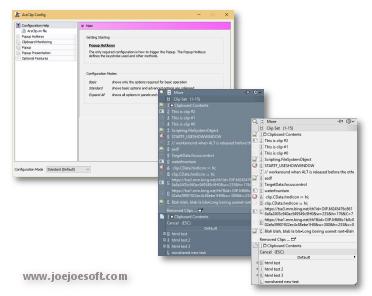
ArsClip used to be barebones, but I think I can safely say that it has become a nicely featured and highly configurable program, due to user feedback.
Delphi 6 (Personal) source code is included - modify it freely for any non-profit use. NOTE: The newer versions are compiled with Turbo Delphi for Win32.
- Multiple Permanent Clip groups
- Picture, RichText, File Copy, Unicode, HTML support
- Copy and paste automation support using Permanent Clips
- Highly configurable
- Win7 Jumplist support
This program requires no installation, but an optional setup program is included. Supported on Windows XP through Windows 7, but it may still work under Windows 2000.
Changes in v4.4
[download replaced by above version]
New:(Permanent Clips)
- command to Find and Replace text on the clipboard
- command to disable monitoring when running a clip
Fix:(Permanent Clips)
- issue with HTML Clips
- reworked keystrokes and commands
- issue with the RUN command and the '[' character
- fixed minor issues with preview window
Fix:(Popup)
- several "List index out of bounds" errors corrected
Fix:(Edit History)
- memory leak when switching tabs
Fix:(Tooltip Hint)
- issue displaying very large text clips
Fix:(Removed Clips)
- error could be caused when starting the program
Fix:(Misc)
- hotkey may stop responding on some systems
- icon cache improvements and fixes
- updated the debug logging
Changes in v4.3
[download replaced by above version]
New: Full Unicode support
New:(Tooltip Window)
- rewritten and redesigned
- improved behavior when shown on system tray icon
New:(Permanent Clips)
- updated WAIT command too allow custom millisecond values
- added new PROMPT command to allow for interactive data inserts
New:(Edit History/Removed Clips)
- icon now shown for type of clip
- improved loading speed
- added new icon scheme to speed up loading of clips
New:(Permanent Clips)
- added new Preview button for testing clips with keystrokes and commands
New:(Configuration)
- added new slider control for number input
New:(Configuration>Popup>Keystrokes)
- added 'Paste as Plaintext Only' keystroke option
- added keystrokes option to paste without closing the popup
New:(Configuration>Pasting)
- added option for pasting using Plain text and Formatted text
- added option for pasting using Formatted text only
- added option for pasting using Plain text only
New:(Misc)
- 'MimicDelayMS' setting added to arsclip.ini to slow down the keyboard mimic speed
Fix:(Popup)
- updated tooltip and popup positions on system tray
- tweaked the Right-Click popup trigger routine
- right-click trigger "Popup" tooltip missing
- autoscroll detection now works with keyboard navigation
- problems with autoscroll on multi-monitor setups with different offsets
Fix:(Permanent Clips)
- detection for && literal ampersand
- detection for TAB key in Custom Keystrokes
- value for PROMPT command used for all identical prompts
Fix:(Edit History)
- problem with Find button
Fix:(System Tray)
- updated the icon flashing routine for compatibility
Fix:(Search)
- clip search routine was broken
Fix:(Misc)
- error message may appear when using specific configuration settings
- error logging updated
Changes in v4.0.2
[download replaced by above version]
New:(Popup)
- popup now scrolled when larger than the screen height
- partial pictures clips displayed on Popup Clips
- added an Alt keypress function for accelerator keys to paste as formatted text
New:(Clipboard Bar)
- clip icon added to window for RichText, HTML, and Files
New:(Trigger Window)
- window is now dragable on the bottom-left corner
New:(Permanent Clips)
- added 'Place on Clipboard Only' Command
New: added 'snap to' behavior to the Trigger Window and Clipboard Bar
Fix(Popup)
- issue with unclickable submenus that are displayed below the main popup
- update to use the Virtual Desktop's top-left corner
- 'current clipboard' background was not always updated correctly
- problem with using Mimic Typing as a Ctrl+Click or Shift+Click keystroke
- display issue with ampersands (also on Clipboard Bar)
- highlight issues when using mouse position
- positioning issues after dragging the popup
- drag mark cosmetic issue
Fix:(Clip Menu)
- issue with position on certain multi-monitor configurations
Fix:(Tooltips)
- text size issue
- now uses the same font settings as the popup
- tab characters are displayed
- improved tooltip displaying of pictures
Fix:(Configuration)
- improved the Show Preview automation to trigger with other settings
Fix:(Trigger Window)
- improved hover detection
Changes in v4.0.1
[download replaced by above version]
New:(Clipboard Bar)
- completely redesigned window
- right-click popup menu added to Clipboard Bar
New:(Popup)
- bottom left corner used to drag the entire popup
- transparent popup in Form Mode
- tweaks to position when reported window locations are wrong
New:(Configuration)
- [Popup] option to disable accelerator keys
- [Popup] option to auto-collapse expandable menus when another is expanded
- [Popup] option to auto-expand expandable menus on hover
- [Popup>Tooltip Hint] option to change the display delay
- [Clipboard>Text Clip] option to ignore small text clips
- [Per-Program Options] button to manually add program names
New:(Clipboard) ignores clips that are all-whitespace
New:(tray icon) new tooltip shown when icon hovered
Fix:(Configuration)
- [Popup>Menu Order] fixed Show Preview font
- [Popup>Menu Order] removed Color option from Set Font dialog
Fix:(Popup)
- several issues fixed when using Form Mode
- minor cosmetic change to the highlight
- error when dragging in a blank area
- minor drag cosmetic issues
- 'Search ...' renamed to 'Search and Paste ...'
Fix:(Permanent Clips)
- issue when showing the Permanent Clip window using a Permanent Clip
- issues with the [RUN] command, web addresses, and [CLIPBRD] with special characters
Fix:(Paste Selected) issues when using keyboard selection
Fix:(Edit History) cosmetic issues for picture clips
Changes in v4.0.0
[download replaced by above version]
New: (Popup) completely redesigned popup window
- Expandable Menus
- new Clip Menu window for editing clips
- drag-and-drop reordering
- Menu key/Application key and Delete key support
- whitespace is replace with symbols for clip captions
- improved the default starting state for a new installation
- accelerator key duplicates prevented
- optional double-height Popup Clip menus
New:(Configuration)
- updated items relating to the new popup
- removed no longer needed options
- (Popup>Menu Order) some menus renamed
- (Popup>Menu Order) - 'Show Preview' button to visualize any changes
- (Popup>Show Options) added a Double Height option
- (Popup>Show Options) option to disable empty menu items instead of hiding them
New:(arsclip.ini file) new section for accelerator keys
New:(Paste Selected Text) window reworked
Fix:(Search)
- cosmetic changes
- Permanent Clip captions not always correct
- timing issues when closing the window
- typing sometimes didn't trigger a search
- error if exited with no items found
- memory leak if Removed Clips found in search results
- bell/beep when Escape pressed
Fix: (Configuration)
- (Popup>Removed Clips) up/down control not working
- (Per-Program Options) icon now only shown for when default settings are changed
Fix: (Removed Clips) issue if size is set to zero
Fix: (Clip Menu) visibility issues
Changes in v3.2.2
New: Improved Permanent Clips edit window
- new Commands added
- new 'Custom Key Combination' option added to Keystrokes
- added example Keystroke and Command items
- new right-click menu options for the Clip to Paste
New: Improved Permanent Clips and Groups window
- new icons to show types of clips
- added a confirmation to the delete command
- fixed selection issues
- cosmetic changes
- clip re-selected after an edit
New: Minor changes existing settings in the Configuration window
- updated [Clipboard>Text Clips]
- updated [Clipboard>Non-Text Clips]
- updated [Popup>Show Options]
- [Popup>Show Options] setting to toggle between using program icons and an icon for the type of clip
New: Improved Edit History/Removed Clips window
- option to export clips to normal Text/RichText/Picture files
Fix: External Edit results now saved to popup
Fix: Clips with keystrokes updated to prevent conflicts
Fix: New clips ignored while External Editor program is editing a clip
Fix: Edit History slow to update after editing a clip
Fix: Program was stopped while until sound stopped playing
Fix: Search window not pasting pictures
Fix: Search window memory leak
Changes in v3.2.1
[download replaced by above version]
New: Revamped Edit History/Removed Clips window
- added RichText preview support
- changed clip display format
- combined Edit History and Recently Removed windows into one
- added a Configuration button
New: Revamped Search window
- improved positioning
- keystrokes labeled
- status messages correctly displayed while searching
New: Revamped Permanent Clip new/edit window
New: Created a new configuration category [Clipboard>History]
New: Created a new configuration category [Clipboard>Sound]
New: Sound options no longer require a registry write and are portable
Fix: Removed Items sometimes shown as empty
Fix: Changing the Removed Clips queue size could incorrectly remove clips
Fix: Fixed Find dialog issues under Removed Clips
Fix: Tweaks to the Tooltip Popup hotkeys
Fix: Sound not played if clip is the exact same as the last
Fix: UAC Admin detection added since ArsClip cannot paste directly into these programs
Fix: Old registry settings removed when sound option is disabled
Fix: Improved the External Editor routine
Changes in v3.2.0
New: Configuration window reworked and categorized
New: Default popup view simplified for new installs
New: User defined Shift+Select and Ctrl+Select keystroke configuration options
New: External Editor support for text and picture clips
New: Clip size shown on tooltip hint
New: Option to use Virtual Desktop for the Trigger Window
New: Tooltip Hint will grow to show larger clips when hovered for longer
Fix: Configuration displayed by default when second instance is run
Fix: Configuration screen not displayed in foreground in some instances
Fix: System menu on popup showed old icons
Fix: 'Current' popup menu item not cleared correctly
Fix: Tweaks and fixes to the Clipboard Bar window
Fix: 'Edit Selected' popup menu item was not always working in Full Mode
Fix: Wrong icon sometimes shown on Program Options popup menu item
Fix: Configuration window shown on taskbar when opened
Changes in 3.1.6
New: Trigger Window configuration option
New: Current popup history automatically saved every 10 minutes
New: 'Edit Clipboard' will now use your default text editor
New: Added an Edit Clipboard shortcut to the tooltip shown when left clicking the system tray icon
New: 'Destroy Item' added to right-click menu
Fix: Popup uses mouse position when target window doesn't correctly report the Caret position
Fix: Tweaked the Search window to try to reduce ignored keystrokes
Fix: Windows launched from Jumplist did not always appear in foreground
Fix: Workaround for popup menu position problems with maximized windows
Fix: Updated the CLIPBRD command to work with the RUN command in Permanent Clips
Changes in 3.1.5
[download replaced by above version]
New: Option to disable the default search word under Show Options
Fix: Removed "Integer Overflow" error message prompt, shown when some lists are empty
Fix: Full Mode now added by default when entire popup is blank
Fix: Column Break was accidentally shown in Full Mode
Fix: Search window pasting was destructive to selected text in target program
Fix: Keystrokes commands on Search window result could cause a crash when list was empty
Fix: Undelete sometimes shown instead of Remove on right-click context menu
Fix: "`" hotkey not triggering Full/Configured item on popup
Fix: Show Order window display problem
Fix: Using Switch from system tray was not saved for current foreground window
Fix: Previous Unicode test fix broke case sensitive configuration option
Fix: Text Item display issue when the only item shown on the popup
Fix: Various fixes to Removed Clips window
Fix: Tooltip Popup after a flush could access missing item
Fix: Workaround for disappearing controls when Alt is pressed
Changes in v3.1.4
[download replace by above version]
New: Jump List support for Windows 7
New: Icon's re-vamped
New: POPUPITEM command in Permanent Items
New: Updated URL fix code to encode spaces for a legal URL
Fix: "replace formatted text with plaintext" option caused a crash
Fix: Clipboard Bar state saved
Fix: Unicode text sometimes falsely detected as duplicate
Fix: Right-Click hold trigger ignored when the mouse is moving [for drag operations]
Fix: Reworded clips to use the word "clip" instead of "item"
Fix: Right-Click on a Permanent Clip on the popup caused an error message
Fix: Mimic Typing speed increased
Fix: Search didn't wait until typings stopped before searching
Fix: The "undelete" item missing from the Recently Removed Clip's right click menu
Fix: Small tweaks to the system tray's menu
Fix: Removed unused "Refresh" system tray item for Vista or above systems
Changes in v3.1.3
[download replace by above version]
New: Option to keep non-text items in a separate list
- Duplicate non-text clips now detected
New: Holding the right mouse button displays the popup
- RightClickDelay variable added to the ArsClip.ini text config file [defaults 600 milliseconds (0.6 seconds)]
- Added new "Program Options" setting to disable the right-click trigger for individual programs.
New: "Paste Selected" will combine and paste items as Unicode (when supported)
- Unicode text now displayed in "Paste Selected" dialog
New: "(Column Break)" item added to Show Order options
(EDIT)Fix: Display warning message if files data cannot be created
Fix: Workaround for crash when system tray icon triggered and display driver reset
- "OldTrayPopup" configuration option added to ArsClip.ini text file
Fix: Permanent Item global hotkeys incorrectly triggered by other programs/hardware
Fix: Errors when copying large, complex items [from programs like Excel]
Fix: Problem with Text Items format configuration
Fix: "Replace formatted text with plaintext" would alter some non-text items, like file copies.
Fix: Some data left on Edit History dialog after "Flush Everything"
Fix: Optional setup program updated
Fix: Minor GUI fixes for the configuration window
Fix: Missing tooltip for Recently Clicked items
Fix: Mimic Typing now works with AltGr generated characters
Fix: Some global hotkeys incorrectly triggered by other programs/hardware
Fix: "Clear" hotkey button not working for editing a Permanent Item
Changes in v3.1.2
New: "Search" popup item
New: Recently Clicked popup submenu item [only shown when not empty]
New: Full/Configured Icon open "Show Order" configuration window
New: "Edit Permanent Items" added to submenu of All Items submenu and Switch To submenu
New: Edit button show on Popup for currently highlighted Permanent Item
New: Sound Enable is now a configuration item (requires registry write when enabled)
Fix: "Make Permanent" failed on the very first run
Fix: New popup menu items don't require a reset of the Show Order user configuration options
Fix: Clipboard Watcher causing constant monitoring refreshing
Fix: Shortcut key for "Last" is now reserved even when not currently shown
Fix: Using the Windows Key as hotkey could cause other hotkeys to execute
Fix: "Permission denied" message incorrectly shown for programs with no text fields
Fix: Dragged Permanent Items with keystrokes problem
Fix: "All Items" was not displayed if last group was empty
Fix: Menu item renamed to "Permanent Groups"
Fix: Right-Click on Non-text Items was not working
Changes in v3.1.1
New: Marker for the current text item on the clipboard
New: Experimental 'Clipboard Bar' system tray menu option
New: Option to set the smallest popup item height in pixels - default 16
New: Icons scaled to fit popup item height
New: Configuration option to disable the 'Copy Selected' operation for non-standard text controls [enabled by default]
Fix: Images copied in Internet Explorer detected as HTML instead of pictures
Fix: Tweaks for the colors on Win2K systems
Fix: Tweaks for Win2K and XP with basic theme
Fix: Rendering of 'System' item and checkboxes update on the popup
Fix: Tweaks to the left column and tooltip header colors to be more compatible with different OSes
Fix: Tooltip shown on tray icon click covered up the icon - interfering with further clicking
Fix: Current Permanent Items doesn't need to be shown in Full Mode, when configured not shown
Fix: "Last:" item doesn't need to be shown in Full Mode when empty
Fix: Tweaks to the 'Edit Selected' item to be more responsive and eliminate possible freezing
Fix: Duplicate line separators sometimes shown
Fix: 'Edit Selected' disabled for the desktop
Fix: 'Mimic Type' setting in Program Options menu item not working
Fix: The "Save to" group option only worked for existing items, not new items.
Changes in v3.1.0
(Note: Original Release had a problem saving permanent items, 310b fixes that problem)
New: XP/Vista Theme Support
New: Updated look for the main popup and the system tray icon popup
New: Option to replace new formatted text clipboard items with plain text
New: "Edit Clipboard" sytem tray icon command
New: "Edit Selected" popup menu item
New: "Move to" right-click option for items on the Permanent Items window
New: Permanent Item edit window now has an option for saving the item to another group
New: Current Clipboard item shown when the system tray icon is clicked
New: Popup hotkey shown on tooltip when system tray icon hovered
New: Option to use a case sensative text item list
New: Included Removed Items in the "Move to first" when selected option
New: Option to show the Edit Item window instead of the popup when highlighted items are detected
New: Pressing Tab simulates pressing the cliptype icon on the main popup
New: "Application" keyboard key can be used instead of a right-click on menu items
Fix: Crash creating a permanent item when no default group exist
Fix: Ctrl+Click configuration option not loaded correctly
Fix: Improved the display speed of the tooltip when the item contains a very large amount of text
Fix: [Program Options->Shift+Insert] setting was not working
Fix: "Current" Permanent Group missing from popup under some configurations
Fix: Some Configuration items re-worded and re-organized
Fix: Hotkey was not being show on system tray's tooltip when "flashing" the icon setting disabled
Fix: Permanent Item name wasn't set when editing certain types of clips
Changes in v3.0.3
New: Permanent Items edit window
New: added Help/About tab to Permanent Items
Fix: "All Items" not shown when no Permanent Items exist
Fix: Empty permanent item groups not shown
Changes in v3.0.2
New: "Flush Clipboard" system tray command
Fix: "Switch To" configuration option not loaded
Fix: -data command fix for 2 files
Fix: Edit window "sticking" when accelerator keys used on popup
Fix: "Maximum width" not loaded on restart
Fix: Broken chain detected, but not corrected
Changes in 3.0.1
New: Vista Clipboard API support - no more chain breaks in Vista
New: "Show Order" configuration option to fully configure the popup
New: popup max width option
New: [Popup -> Tooltip Hint] max width and height options
New: Improved disabled monitoring notification on the system tray
New: Save to Popup button on the Edit Item window
New: [P] cliptype icon for pictures
Fix: "-data" switch not saving all files in profile
Fix: Removed Items Flush rewritten
Fix: Program quits in Vista when hotkey pressed for High integrity process
Fix: Pictures scaled to fit tooltip
Fix: Only true type fonts were shown on Set Popup Font dialog
Fix: now only Text or Non-Text icons are outlined when highlighted
Fix: "Show Options" simplified to reflect Show Order changes
Fix: Font styles, sizes, and color settings for popup implemented (see Set Popup Font button)
Fix: minor font changes to windows and dialogs for ClearType support
Changes in 3.0.0
New: Right-Click menu item to show Menu (woohoo!)
New: Improved tooltip (hint window) graphics and positioning
New: Updated visuals for highlighted popup items
New: Program icon can be clicked on popup to Edit current item
New: "Program options" item on popup
New: "[CLIPBRD]" keystroke/command that inserts current clipboard contents into a Permanent Item when pasted - making it a template.
New: added "-data" command line option to store data in the current user's profile
New: "Edit" button on preview window
New: Right-Click cut/copy/paste menu for Edit window
New: Disable Chain Break detection option (for Vista)
New: Improved accelerator keys generation
New: Improved Unicode item displaying in Permanent Items
Fix: Index Out of Bounds error occurs when users run ArsClip for long periods of time
Fix: Problems when configured to show main popup on system tray
Fix: Removed Items Flush can fail if program immediately closed
Fix: Workaround for VBA (Visual Basic) clipboard items
Fix: Rare case where chain break detection is turned off permanently after the first break
Fix: Problem with Removed Items cache off by 1
Fix: Access Error when no text, non-text, or permanent items are on the popup.
Changes in 2.8.7
Fix: text truncated when pasted twice and "Last:" Show Option enabled
Changes in 2.8.6
New: Popup rewritten
New: Clickable cliptype icon to paste as formatted text
New: Complex text items configuration option for HTML, Unicode, and RichText
New: Improved ellipses (...) for URLs and filenames
New: Flush Everything system tray option
New: Automatically generated shortcut keys for all main popup items, including Permanent Items [when option enabled]
New: "SPACE" keyboard emulation option
Fix: Flushed items sometimes revert after a reboot
Fix: Hoovered tooltip's height limited
Changes in 2.8.5
Fix: Complex Permanent Items ignored
Fix: Delete Group button broken
Fix: Show "Last/Current" config options broken
Fix: "Edit Item" menu item not working on Permanent Items
Fix: Dialogs/Tooltips only appearing on Primary monitor for multi-monitor systems
New: (Paste Clipboard as Plaintext) hotkey
New: "Run" command added and renamed "Keystroke" checkbox
New: Global hotkey shown in tooltip
Changes in v2.8.4
Fix: Error message when you press a Global Hotkey
Fix: Move and Edit dialog windows sometimes appearing offscreen
Fix: "Make Permanet Item" fails when AutoPreview tab is selected
Fix: Some buttons incorrectly enabled on Permanent Items form
Fix: Crash when moving very last permanent item
Fix: Global Hotkey not included for "Move" button
Fix: "Division by Zero" when displaying empty "Removed Items"
Changes in v2.8.3
Fix: New/Up/Down buttons not working in Permenent Items
Fix: CTRL and SHIFT reversed for Global hotkeys
NOTE: Program version reads incorrectly as v2.8.2 - but it's the correct release.
Changes in v2.8.1
Fix: Recently Removed items count not set on restart
Fix: "Switch to" configuration options not working
Fix: Reworded some configuration option to be clearer in meaning
Fix: Firefox 1.5 items not being retreived as CF_HTML
New: Optional Global Hotkeys for each permanent item
New: "Clear" permanent item keystroke to clear the clipboards contents
Changes in v2.8.0
Fix: 100% CPU usage for Next / Previous Tooltip Popup
New: Configuration option for Recently Removed item
ANY USE BY YOU OF THE SOFTWARE IS AT YOUR OWN RISK. THE
SOFTWARE IS PROVIDED FOR USE "AS IS" WITHOUT WARRANTY OF
ANY KIND. TO THE MAXIMUM EXTENT PERMITTED BY LAW, THE
SOFTWARE'S CREATOR DISCLAIMS ALL WARRANTIES OF ANY
KIND, EITHER EXPRESS OR IMPLIED, INCLUDING, WITHOUT
LIMITATION, IMPLIED WARRANTIES OR CONDITIONS OF
MERCHANTABILITY AND FITNESS FOR A PARTICULAR PURPOSE.
THE SOFTWARE'S CREATOR IS NOT OBLIGATED TO PROVIDE
ANY UPDATES OR UPGRADES TO THE SOFTWARE. THE INCLUDED
SOURCE CODE MAY BE MODIFIED AND DISTRIBUTED FOR NON-PROFIT
USE ONLY.


